Join us at FabCon Atlanta from March 16 - 20, 2026, for the ultimate Fabric, Power BI, AI and SQL community-led event. Save $200 with code FABCOMM.
Register now!The Power BI Data Visualization World Championships is back! Get ahead of the game and start preparing now! Learn more
Hello, I am facing an issue in Power BI.
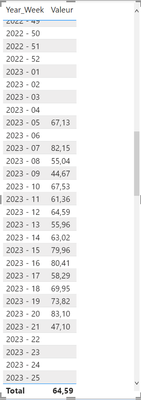
I have a table 'Calendar - Weeks' that contains all values in this format 'YYYY - WW'. It is linked to a table containing data on sports activities. Some weeks does not contain sports data so they are empty values.
I have a date slicer which allow to filter the week where I want data. However, I would like to show elements with no data but only in a specific range.
For example :
Here I would like to keep all weeks between 05 and 21 but also the week 06.
How can I do that ? Do I need to replace the empty value by 0 when it is inside the range ?
Thanks in advance for your help and your time
Hi @maxduff59 ,
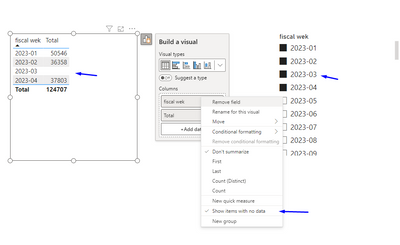
On your visualization for the calendar column select the option Show items with no data.
https://learn.microsoft.com/en-us/power-bi/create-reports/desktop-show-items-no-data
Regards
Miguel Félix
Proud to be a Super User!
Check out my blog: Power BI em PortuguêsI tried that options but when I do that it is also showing values that are not in my date range 😕
Hi @maxduff59 ,
Are both table related? To my knowledge and the tests that I did if you select values from a slicer and then do the show items without data it will only present the value inside the slicer selection:
However if you are using an unrelated table with a measure this then can return values, how is your model setup?
Regards
Miguel Félix
Proud to be a Super User!
Check out my blog: Power BI em PortuguêsThe Power BI Data Visualization World Championships is back! Get ahead of the game and start preparing now!
| User | Count |
|---|---|
| 63 | |
| 55 | |
| 42 | |
| 41 | |
| 23 |
| User | Count |
|---|---|
| 171 | |
| 136 | |
| 119 | |
| 79 | |
| 54 |