
Don't miss your chance to take the Fabric Data Engineer (DP-700) exam on us!
Learn moreWe've captured the moments from FabCon & SQLCon that everyone is talking about, and we are bringing them to the community, live and on-demand. Starts on April 14th. Register now
Hi Community,
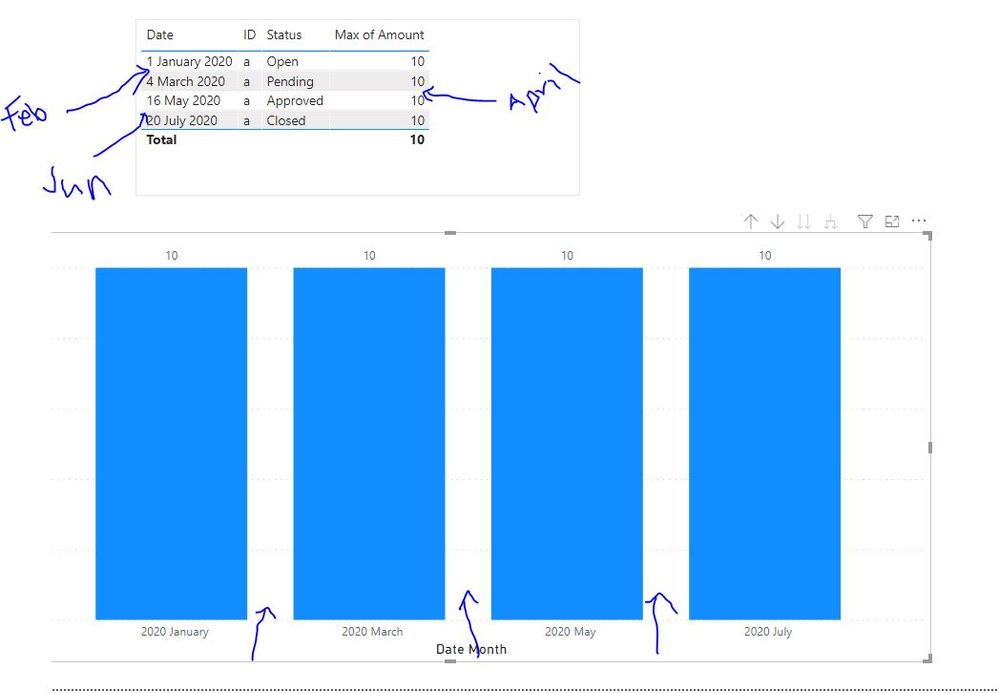
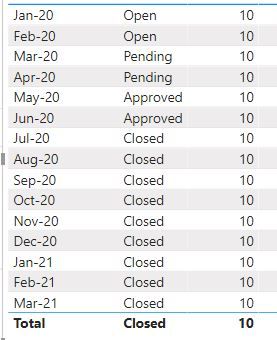
I have a very simple data from excel sheet. I want to show amount in all months from "Opened" till "Closed" Status.
Essentially I want to show from Jan till July for this ID "a".
Jan is in Open Status therefore Feb will be in "Open"
March is Pending so April will be in "Pending"
May is Approved so June will be in "Approved"
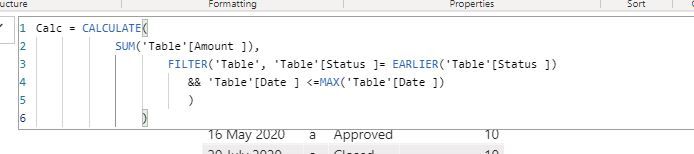
I created a new COlumn :
Feb , APril and June doesnt show in the graph
Please help 😄
Solved! Go to Solution.
@schoden ,My bad
calculate(lastnonblankvalue(Date[Date],max(Table[status])), filter(allselected(Date),Date[Date] <=max(Date[Date])))
@schoden , with help from a date table, try a measure like
filter(lastnonblankvalue(Date[Date],max(Table[status])), filter(allselected(Date),Date[Date] <=max(Date[Date])))
To get the best of the time intelligence function. Make sure you have a date calendar and it has been marked as the date in model view. Also, join it with the date column of your fact/s. Refer :radacad sqlbi My Video Series Appreciate your Kudos.
Hi @amitchandak ,
Sorry for for gap but I am struggling to get lastnonblankvalue for EACH ID in Each MONTH ?
For example in Jan 2020 there are two IDS - show all value for all each ID.
Will really appreciate.
If you have recently started exploring Fabric, we'd love to hear how it's going. Your feedback can help with product improvements.
A new Power BI DataViz World Championship is coming this June! Don't miss out on submitting your entry.
Share feedback directly with Fabric product managers, participate in targeted research studies and influence the Fabric roadmap.
| User | Count |
|---|---|
| 55 | |
| 34 | |
| 31 | |
| 19 | |
| 17 |
| User | Count |
|---|---|
| 74 | |
| 71 | |
| 38 | |
| 35 | |
| 25 |