Join us at FabCon Atlanta from March 16 - 20, 2026, for the ultimate Fabric, Power BI, AI and SQL community-led event. Save $200 with code FABCOMM.
Register now!The Power BI Data Visualization World Championships is back! Get ahead of the game and start preparing now! Learn more
I would like to add a measure value next to the dimension in a filter. Use case is: if a user wants to know the impact of what the dimension value has on the visuals it would be nice to have that value in the filter itself.
Example: I have a page showing marketing analytics data and I want to filter by the source, but I want to show the number of pageviews that correspond to the source in the filter and I want the dimension (source) to sort by the number of pageviews. I know this can be done in a table and click on the table value, but I'd like to have it in a filter.
Solved! Go to Solution.
First thought was if you have an existing measure just to add a calculated column but you could build it in PowerQuery or at Source.
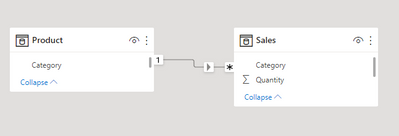
I mocked something very simply up:
Created a Products Sold measure:
Products Sold = SUM ( Sales[Quantity] )
Then on the product dimension table added a calculated column with following dax:
Slicer Label = Product[Category] & " (" & [Products Sold] & ")"
You can then get this:
Just be clear that because it's using a calculated column it won't respond to other filters.
You'd have to pre calculate it into your dimension table as a calculated column in order to use it in a slicer. That won't respond dynamically to other filters though. Apart from that you can't directly include a measure in a slicer.
You're referring to doing that in the source, or are you thinking of doing that in Power Query?
First thought was if you have an existing measure just to add a calculated column but you could build it in PowerQuery or at Source.
I mocked something very simply up:
Created a Products Sold measure:
Products Sold = SUM ( Sales[Quantity] )
Then on the product dimension table added a calculated column with following dax:
Slicer Label = Product[Category] & " (" & [Products Sold] & ")"
You can then get this:
Just be clear that because it's using a calculated column it won't respond to other filters.
The Power BI Data Visualization World Championships is back! Get ahead of the game and start preparing now!
Check out the November 2025 Power BI update to learn about new features.
| User | Count |
|---|---|
| 59 | |
| 43 | |
| 42 | |
| 23 | |
| 17 |
| User | Count |
|---|---|
| 190 | |
| 122 | |
| 96 | |
| 66 | |
| 47 |