Join us at FabCon Atlanta from March 16 - 20, 2026, for the ultimate Fabric, Power BI, AI and SQL community-led event. Save $200 with code FABCOMM.
Register now!The Power BI Data Visualization World Championships is back! Get ahead of the game and start preparing now! Learn more
I would like to add a measure value next to the dimension in a filter. Use case is: if a user wants to know the impact of what the dimension value has on the visuals it would be nice to have that value in the filter itself.
Example: I have a page showing marketing analytics data and I want to filter by the source, but I want to show the number of pageviews that correspond to the source in the filter and I want the dimension (source) to sort by the number of pageviews. I know this can be done in a table and click on the table value, but I'd like to have it in a filter.
Solved! Go to Solution.
First thought was if you have an existing measure just to add a calculated column but you could build it in PowerQuery or at Source.
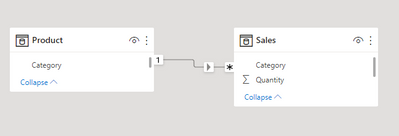
I mocked something very simply up:
Created a Products Sold measure:
Products Sold = SUM ( Sales[Quantity] )
Then on the product dimension table added a calculated column with following dax:
Slicer Label = Product[Category] & " (" & [Products Sold] & ")"
You can then get this:
Just be clear that because it's using a calculated column it won't respond to other filters.
You'd have to pre calculate it into your dimension table as a calculated column in order to use it in a slicer. That won't respond dynamically to other filters though. Apart from that you can't directly include a measure in a slicer.
You're referring to doing that in the source, or are you thinking of doing that in Power Query?
First thought was if you have an existing measure just to add a calculated column but you could build it in PowerQuery or at Source.
I mocked something very simply up:
Created a Products Sold measure:
Products Sold = SUM ( Sales[Quantity] )
Then on the product dimension table added a calculated column with following dax:
Slicer Label = Product[Category] & " (" & [Products Sold] & ")"
You can then get this:
Just be clear that because it's using a calculated column it won't respond to other filters.
The Power BI Data Visualization World Championships is back! Get ahead of the game and start preparing now!
| User | Count |
|---|---|
| 40 | |
| 38 | |
| 36 | |
| 29 | |
| 28 |
| User | Count |
|---|---|
| 127 | |
| 88 | |
| 78 | |
| 66 | |
| 65 |