cancel
Showing results for 
Search instead for 
Did you mean: 

Data Days is here! Join us now for 60+ days of learning, challenges, and connection. Learn more

Reply
Anonymous
Not applicable

Show Values with Select All when using filtered function

Hi , 


I am using 

Measure = CALCULATE ( IF ( ISFILTERED ( TERM[TermName]), 1, 0 ), ALLSELECTED ( CUSTOMERTABLE ) )
 
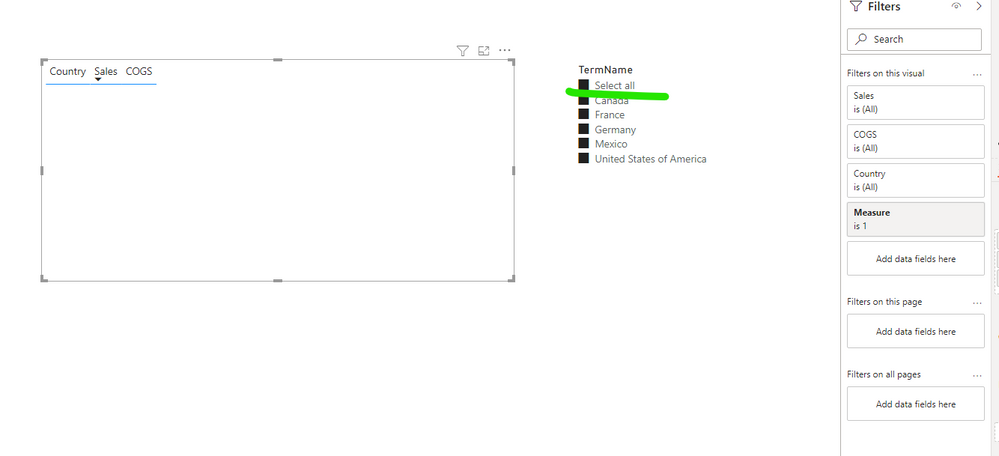
to show blank values in visual when nothing is selected. I set the visual filter to "1" and it works for the selected filter. However, when I click "select all" the visual is still blank - how do I fix this?
1 ACCEPTED SOLUTION
v-easonf-msft
Community Support
Community Support

Hi, @Anonymous  

This is the expected behavior if you are using the default slicer in Powerbi Desktop. 

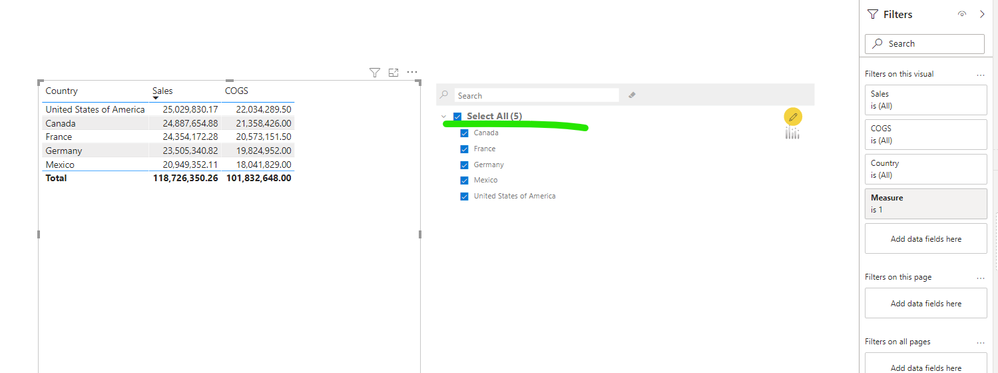
46.png

Based on my test,when the slicer ‘select all’ is checked, it is actually equivalent to ‘nothing is selected’. This is by design, it just makes the slice appear to be in an all-selected state.

Therefore, when you use isfiltered to force the visual  to show blank values when ‘nothing is selected’, the visual also show blank values when 'all selected' is checked.


As a workaround, you can try to use  Hierarchical filter.

35.png

48.png


Best Regards,
Community Support Team _ Eason


View solution in original post

3 REPLIES 3
v-easonf-msft
Community Support
Community Support

Hi, @Anonymous  

This is the expected behavior if you are using the default slicer in Powerbi Desktop. 

46.png

Based on my test,when the slicer ‘select all’ is checked, it is actually equivalent to ‘nothing is selected’. This is by design, it just makes the slice appear to be in an all-selected state.

Therefore, when you use isfiltered to force the visual  to show blank values when ‘nothing is selected’, the visual also show blank values when 'all selected' is checked.


As a workaround, you can try to use  Hierarchical filter.

35.png

48.png


Best Regards,
Community Support Team _ Eason


PhilipTreacy
Super User
Super User

Hi @Anonymous 

Try this

Measure = CALCULATE( IF( ISBLANK(SELECTEDVALUE('TERM'[TermName])) && DISTINCTCOUNT('TERM'[TermName]) = COUNTROWS(ALL('TERM')),0,1), ALLSELECTED( CUSTOMERTABLE))

Regards

Phil


Did I answer your question? Then please mark my post as the solution.
If I helped you, click on the Thumbs Up to give Kudos.


Blog :: YouTube Channel :: Connect on Linkedin


Proud to be a Super User!


Anonymous
Not applicable

Hi Phil, 


Thank you for your reply. This solution does not show a blank visual when there is nothing filtered. Could you help with troubleshooting

Helpful resources

Announcements
Fabric Data Days is here Carousel

Fabric Data Days 2026

Don't miss out on Data Days, June 15 through August 7. Learn Fabric, Power BI, SQL, AI and more.

May Power BI Update Carousel

Power BI Monthly Update - May 2026

Check out the May 2026 Power BI update to learn about new features.

Power BI DataViz World Championships carousel

Power BI DataViz World Championships - June 2026

A new Power BI DataViz World Championship is coming this June! Don't miss out on submitting your entry.