Join us at FabCon Atlanta from March 16 - 20, 2026, for the ultimate Fabric, Power BI, AI and SQL community-led event. Save $200 with code FABCOMM.
Register now!The Power BI Data Visualization World Championships is back! Get ahead of the game and start preparing now! Learn more
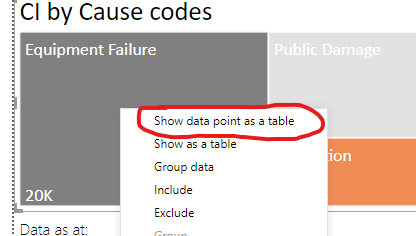
I'm rebuilding a report and I can't find out how they turned on this feature. See image below. I know I can create a tooltip page or drill through page, but to me this is much cleaner and easier. Any thoughts.
Solved! Go to Solution.
Hi @Anonymous ,
Maybe you can also refer the following simliar case:
Best Regards,
Yingjie Li
If this post helps then please consider Accept it as the solution to help the other members find it more quickly.
Hi @Anonymous ,
Maybe you can also refer the following simliar case:
Best Regards,
Yingjie Li
If this post helps then please consider Accept it as the solution to help the other members find it more quickly.
@Anonymous Right-click on a data element to expose those options...
The Power BI Data Visualization World Championships is back! Get ahead of the game and start preparing now!
| User | Count |
|---|---|
| 38 | |
| 37 | |
| 34 | |
| 31 | |
| 27 |
| User | Count |
|---|---|
| 136 | |
| 99 | |
| 73 | |
| 66 | |
| 65 |