Join us at FabCon Atlanta from March 16 - 20, 2026, for the ultimate Fabric, Power BI, AI and SQL community-led event. Save $200 with code FABCOMM.
Register now!Learn from the best! Meet the four finalists headed to the FINALS of the Power BI Dataviz World Championships! Register now
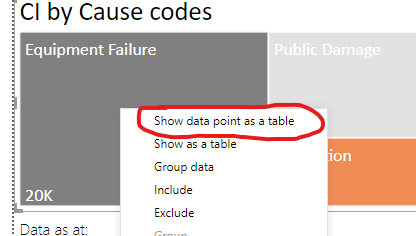
I'm rebuilding a report and I can't find out how they turned on this feature. See image below. I know I can create a tooltip page or drill through page, but to me this is much cleaner and easier. Any thoughts.
Solved! Go to Solution.
Hi @Anonymous ,
Maybe you can also refer the following simliar case:
Best Regards,
Yingjie Li
If this post helps then please consider Accept it as the solution to help the other members find it more quickly.
Hi @Anonymous ,
Maybe you can also refer the following simliar case:
Best Regards,
Yingjie Li
If this post helps then please consider Accept it as the solution to help the other members find it more quickly.
@Anonymous Right-click on a data element to expose those options...
Share feedback directly with Fabric product managers, participate in targeted research studies and influence the Fabric roadmap.
Check out the February 2026 Power BI update to learn about new features.
| User | Count |
|---|---|
| 61 | |
| 59 | |
| 42 | |
| 18 | |
| 15 |
| User | Count |
|---|---|
| 109 | |
| 102 | |
| 39 | |
| 29 | |
| 29 |