cancel
Showing results for 
Search instead for 
Did you mean: 

Next up in the FabCon + SQLCon recap series: The roadmap for Microsoft SQL and Maximizing Developer experiences in Fabric. All sessions are available on-demand after the live show. Register now

Reply
Anonymous
Not applicable

Sharepoint Query Connection Isssue

Hi Guys,


I am trying to develop a report in which I get data from an excel file in a sharepoint folder.


My manager shared this folder with me so I copied the path of an excel report in this sharepoint folder and uploaded in PowerBI. My manager replaces this report everyday for another with exactly the same name.


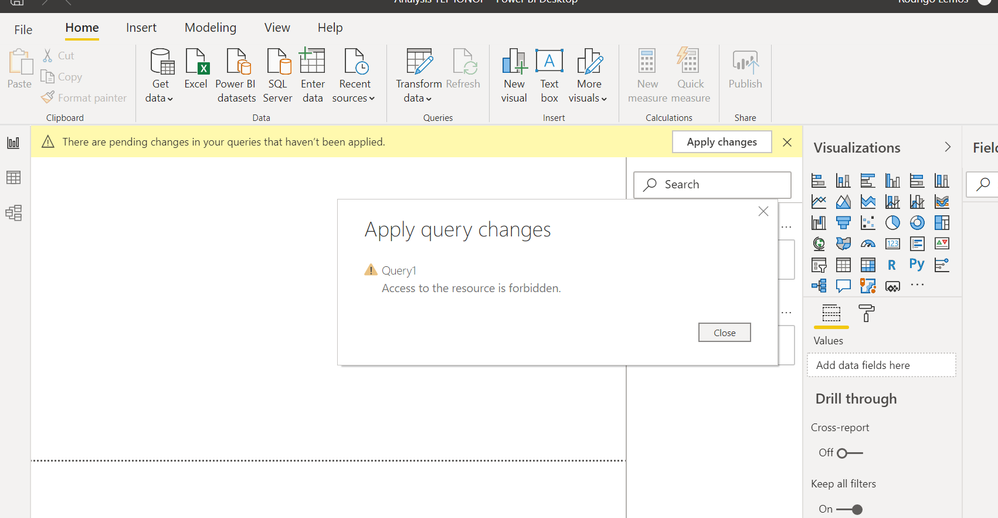
In the first day it was perfect when I connected but after my manager replaces the report for a new one (he replaces the file daily but keep the same name) I cannot access anymore and I get the below error. From this I understand that when he replaces the excel file in sharepoint folder I cannot access the query anymore? How can I solve it and have the info automatically updated whenever he replaces the file on sharepoint? 


Thank you in advance!

PBI doubts.PNG

1 ACCEPTED SOLUTION
v-xicai
Community Support
Community Support

Hi @Anonymous ,


You may go to File->Options and Settings->Data Source Settings->Global permissions in Power BI Desktop, find the data source stored SharePoint,  click "Edit permissions", then click "Edit", choose organizational account method (or Microsoft account) to sign in the appropriate credential.


or click "clear permissions" for stored SharePoint data source, then connect to the data using SharePoint folder connector again, use the URL below and use organizational account method.  See more: Connecting to Files in SharePoint & OneDrive with Power BI / Power Query.


https://xxxxx.sharepoint.com/sites/<sitename>


Best Regards,

Amy 


Community Support Team _ Amy

If this post helps, then please consider Accept it as the solution to help the other members find it more quickly.

View solution in original post

3 REPLIES 3
vanessafvg
Community Champion
Community Champion

as amy said below clear permissions and make sure you sign in with your microsoft account.


If I took the time to answer your question and I came up with a solution, please mark my post as a solution and /or give kudos freely for the effort 🙂 Thank you!

Proud to be a Super User!


v-xicai
Community Support
Community Support

Hi @Anonymous ,


You may go to File->Options and Settings->Data Source Settings->Global permissions in Power BI Desktop, find the data source stored SharePoint,  click "Edit permissions", then click "Edit", choose organizational account method (or Microsoft account) to sign in the appropriate credential.


or click "clear permissions" for stored SharePoint data source, then connect to the data using SharePoint folder connector again, use the URL below and use organizational account method.  See more: Connecting to Files in SharePoint & OneDrive with Power BI / Power Query.


https://xxxxx.sharepoint.com/sites/<sitename>


Best Regards,

Amy 


Community Support Team _ Amy

If this post helps, then please consider Accept it as the solution to help the other members find it more quickly.

amitchandak
Super User
Super User

Helpful resources

Announcements
New to Fabric survey Carousel

New to Fabric Survey

If you have recently started exploring Fabric, we'd love to hear how it's going. Your feedback can help with product improvements.

Power BI DataViz World Championships carousel

Power BI DataViz World Championships - June 2026

A new Power BI DataViz World Championship is coming this June! Don't miss out on submitting your entry.

Join our Fabric User Panel

Join our Fabric User Panel

Share feedback directly with Fabric product managers, participate in targeted research studies and influence the Fabric roadmap.

March Power BI Update Carousel

Power BI Community Update - March 2026

Check out the March 2026 Power BI update to learn about new features.