cancel
Showing results for 
Search instead for 
Did you mean: 

We've captured the moments from FabCon & SQLCon that everyone is talking about, and we are bringing them to the community, live and on-demand. Starts on April 14th. Register now

Reply
terpsbmore
Helper I
Helper I

SharePoint Access

Hello All,


So I tried to connect to a SharePoint list from PBI Desktop for the first time. I chose to connect anonymously as a test to see what happened and I was not able to connect. When I initiated the process again it did not give me the option to connect with my Windows credentials and just denies me access. Does anyone know how to reset this or force PBI to ask for my Windows/MS credentials?


Thanks,


AG

1 ACCEPTED SOLUTION
Aron_Moore
Solution Specialist
Solution Specialist

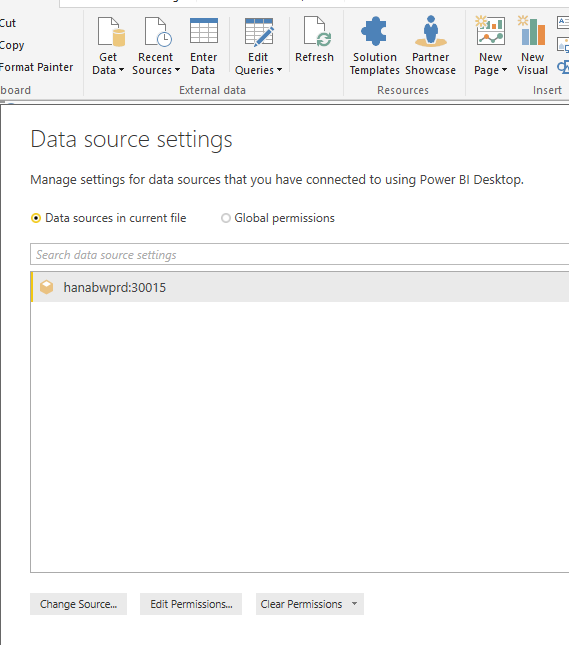
Edit Queries -> Data source settings -> Edit or Clear permissions?


Capture.PNG

View solution in original post

2 REPLIES 2
Aron_Moore
Solution Specialist
Solution Specialist

Edit Queries -> Data source settings -> Edit or Clear permissions?


Capture.PNG

@Aron_Moore Thank you for the help. To clarify, I did chose to "Edit" the permissions and that allowed me to update to use my Windows/MS credentials.

Helpful resources

Announcements
New to Fabric survey Carousel

New to Fabric Survey

If you have recently started exploring Fabric, we'd love to hear how it's going. Your feedback can help with product improvements.

Power BI DataViz World Championships carousel

Power BI DataViz World Championships - June 2026

A new Power BI DataViz World Championship is coming this June! Don't miss out on submitting your entry.

Join our Fabric User Panel

Join our Fabric User Panel

Share feedback directly with Fabric product managers, participate in targeted research studies and influence the Fabric roadmap.

March Power BI Update Carousel

Power BI Community Update - March 2026

Check out the March 2026 Power BI update to learn about new features.