Join us at FabCon Atlanta from March 16 - 20, 2026, for the ultimate Fabric, Power BI, AI and SQL community-led event. Save $200 with code FABCOMM.
Register now!The Power BI Data Visualization World Championships is back! Get ahead of the game and start preparing now! Learn more
I have a county shape map with a legend by year. A county can have multiple values from different years (2016, 2017, 2018, 2019, etc). How can I have the map show the latest year color? It seems to color code based on the earliest year from what I can tell. Thanks.
Solved! Go to Solution.
Hi @mattthew ,
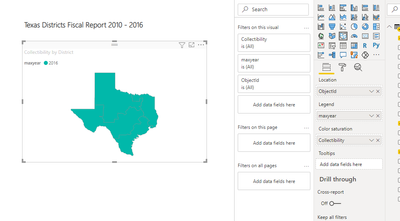
Create a column similarly as below:
maxyear = MAXX(ALL(Table8a),'Table8a'[Year])
And you will see:
For my sample .pbix file,pls see attached.
Best Regards,
Kelly
Did I answer your question? Mark my post as a solution!
Hi @v-kelly-msft , thanks for the reference. This put me down a path of reviewing maxx and it looked like what I was seeking blogenterprisedna had documentation for.
For those not wanting to click on the url the solution is:
Max Date =
VAR CurrentName = 'Dataset'[Name]
RETURN
MAXX(
FILTER( ALL('Dataset'), 'Dataset'[Name] = CurrentName ) ,
'Dataset'[Date Taken]')
Then placing Max Date in the legend.
Thanks Again!
Hi @mattthew ,
Create a column similarly as below:
maxyear = MAXX(ALL(Table8a),'Table8a'[Year])
And you will see:
For my sample .pbix file,pls see attached.
Best Regards,
Kelly
Did I answer your question? Mark my post as a solution!
Hi @v-kelly-msft , thanks for the reference. This put me down a path of reviewing maxx and it looked like what I was seeking blogenterprisedna had documentation for.
For those not wanting to click on the url the solution is:
Max Date =
VAR CurrentName = 'Dataset'[Name]
RETURN
MAXX(
FILTER( ALL('Dataset'), 'Dataset'[Name] = CurrentName ) ,
'Dataset'[Date Taken]')
Then placing Max Date in the legend.
Thanks Again!
The Power BI Data Visualization World Championships is back! Get ahead of the game and start preparing now!
| User | Count |
|---|---|
| 40 | |
| 35 | |
| 34 | |
| 31 | |
| 28 |
| User | Count |
|---|---|
| 137 | |
| 102 | |
| 71 | |
| 67 | |
| 65 |