cancel
Showing results for 
Search instead for 
Did you mean: 

The Power BI Data Visualization World Championships is back! Get ahead of the game and start preparing now! Learn more

Reply
Anonymous
Not applicable

Shape Map Data Colours / Data labels

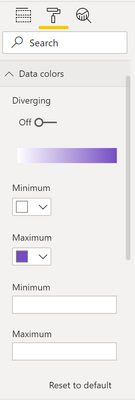
I've recently updated to v 2.102.845.0 but seem to have a couple of issues with custom shape maps since. In the past/previous versions I was able to change the data colours and add minimum/maximum values (see below image).


However since this new update I can't find the equivalent, so can't update data colours beyond the default blue or add the min/max. Is this a feature of the new update or am I just looking in the wrong place? Thanks


samuelhesketh_0-1646760834883.png


1 ACCEPTED SOLUTION
Anonymous
Not applicable

Hi @Anonymous and @pattersonm8 ,

The issue(ICM: 294168933) has been reported internally, the related support team is working on it. The fix will be deployed later. I will update you with any progress. Thank you.

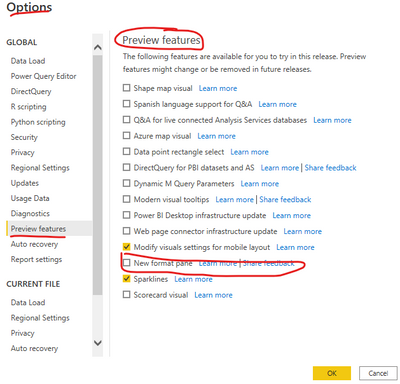
And there is a workaround over here: please navigate to File>Options and Settings>Options>Preview feature, unselect the option "New format pane" just as below screenshot. Later check whether you can change the data colors.

yingyinr_0-1646988194646.png

Best Regards

View solution in original post

4 REPLIES 4
Anonymous
Not applicable

Hi @Anonymous and @pattersonm8 ,

The issue(ICM: 294168933) has been reported internally, the related support team is working on it. The fix will be deployed later. I will update you with any progress. Thank you.

And there is a workaround over here: please navigate to File>Options and Settings>Options>Preview feature, unselect the option "New format pane" just as below screenshot. Later check whether you can change the data colors.

yingyinr_0-1646988194646.png

Best Regards

Anonymous
Not applicable

I tried to do the same thing. The panel is back to what it was before, but still without the color conditional option


pattersonm8
Helper II
Helper II

SAME - what has happened to ability to update the colors!

AllisonKennedy
Super User
Super User

@Anonymous It might have gotten lost in the feature update. Have you contacted support or searched Power BI issues to see if others have the same problem? https://community.powerbi.com/t5/Issues/idb-p/Issues 


Please @mention me in your reply if you want a response.

Copying DAX from this post? Click here for a hack to quickly replace it with your own table names

Has this post solved your problem? Please Accept as Solution so that others can find it quickly and to let the community know your problem has been solved.
If you found this post helpful, please give Kudos C

I work as a Microsoft trainer and consultant, specialising in Power BI and Power Query.
www.excelwithallison.com

Helpful resources

Announcements
Power BI DataViz World Championships

Power BI Dataviz World Championships

The Power BI Data Visualization World Championships is back! Get ahead of the game and start preparing now!

December 2025 Power BI Update Carousel

Power BI Monthly Update - December 2025

Check out the December 2025 Power BI Holiday Recap!

FabCon Atlanta 2026 carousel

FabCon Atlanta 2026

Join us at FabCon Atlanta, March 16-20, for the ultimate Fabric, Power BI, AI and SQL community-led event. Save $200 with code FABCOMM.