This is best Fabric, Power BI, SQL and AI community event. How do we know? The last event sold out! Save €200 with code FABCMTY200.
Register nowA new Data Days event is coming soon! This time we’re going bigger than ever. Fabric, Power BI, SQL, AI and more. Don't miss out.
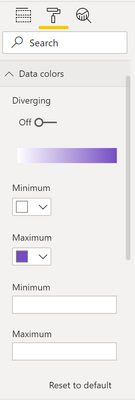
I've recently updated to v 2.102.845.0 but seem to have a couple of issues with custom shape maps since. In the past/previous versions I was able to change the data colours and add minimum/maximum values (see below image).
However since this new update I can't find the equivalent, so can't update data colours beyond the default blue or add the min/max. Is this a feature of the new update or am I just looking in the wrong place? Thanks
Solved! Go to Solution.
Hi @Anonymous and @pattersonm8 ,
The issue(ICM: 294168933) has been reported internally, the related support team is working on it. The fix will be deployed later. I will update you with any progress. Thank you.
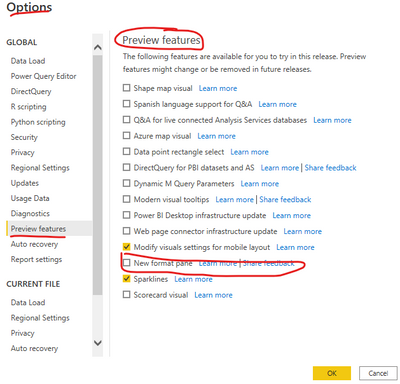
And there is a workaround over here: please navigate to File>Options and Settings>Options>Preview feature, unselect the option "New format pane" just as below screenshot. Later check whether you can change the data colors.
Best Regards
Hi @Anonymous and @pattersonm8 ,
The issue(ICM: 294168933) has been reported internally, the related support team is working on it. The fix will be deployed later. I will update you with any progress. Thank you.
And there is a workaround over here: please navigate to File>Options and Settings>Options>Preview feature, unselect the option "New format pane" just as below screenshot. Later check whether you can change the data colors.
Best Regards
I tried to do the same thing. The panel is back to what it was before, but still without the color conditional option
SAME - what has happened to ability to update the colors!
@Anonymous It might have gotten lost in the feature update. Have you contacted support or searched Power BI issues to see if others have the same problem? https://community.powerbi.com/t5/Issues/idb-p/Issues
Copying DAX from this post? Click here for a hack to quickly replace it with your own table names
Has this post solved your problem? Please Accept as Solution so that others can find it quickly and to let the community know your problem has been solved.
If you found this post helpful, please give Kudos C
I work as a Microsoft trainer and consultant, specialising in Power BI and Power Query.
www.excelwithallison.com
Check out the May 2026 Power BI update to learn about new features.
Sign up to receive a private message when registration opens and key events begin.
If you have recently started exploring Fabric, we'd love to hear how it's going. Your feedback can help with product improvements.
| User | Count |
|---|---|
| 27 | |
| 25 | |
| 25 | |
| 21 | |
| 14 |
| User | Count |
|---|---|
| 50 | |
| 46 | |
| 23 | |
| 18 | |
| 18 |