Learn from the best! Meet the four finalists headed to the FINALS of the Power BI Dataviz World Championships! Register now
Hi,
I need help to find a solution to the following problem:
I'm building a report that summarizes how time is spent within the organization which is updated on a monthly basis. The trends for the last month are obviously more relevant i.e. total time spent , growth from previous month...etc. I'd like to find a way in which I set the reporting date as of a specific month i.e May-21 so this is reflected in the different KPI cards and visuals. I found a way to achieve this by using filters, but I'd like to know if there is a better way that is less manual.
I'm pretty new to powerbi...
Thank you,
Kind regards,
Salvador
Solved! Go to Solution.
Hi @sbenzaquen ,
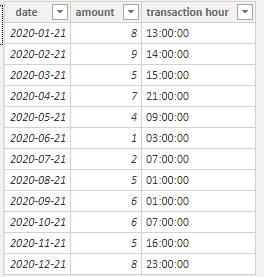
I create some data:
Here are the steps you can follow:
Create calendar.
Date = CALENDARAUTO()
Report transaction time as of Mar-21:
Create measure.
report transaction time as of Mar-21 =
var _select= SELECTEDVALUE('Date'[Date])
return
IF(_select=DATE(YEAR(_select),3,21),
CALCULATE(MAX('Table'[transaction hour]),FILTER(ALL('Table'),'Table'[date]=_select)),
CALCULATE(MAX('Table'[transaction hour]),FILTER(ALL('Table'),'Table'[date]=DATE(YEAR(_select),3,21))))
Growth vs. prior month:
1. Create measure.
This month =
var _date=SELECTEDVALUE('Date'[Date])
return
CALCULATE(SUM('Table'[amount]),FILTER(ALL('Table'),[date]>=DATE(YEAR(_date),MONTH(_date),1)&&[date]<=_date))Last month =
var _date=SELECTEDVALUE('Date'[Date])
return
CALCULATE(SUM('Table'[amount]),FILTER(ALL('Table'),[date]>=DATE(YEAR(_date),MONTH(_date)-1,1)&&[date]<=DATE(YEAR(_date),MONTH(_date)-1,DAY(_date))))
2. Using [Date] in the Date table as a slicer, put [This month] and [Last month] into the KPI.
Result:
Best Regards,
Liu Yang
If this post helps, then please consider Accept it as the solution to help the other members find it more quickly.
Hi @sbenzaquen ,
I create some data:
Here are the steps you can follow:
Create calendar.
Date = CALENDARAUTO()
Report transaction time as of Mar-21:
Create measure.
report transaction time as of Mar-21 =
var _select= SELECTEDVALUE('Date'[Date])
return
IF(_select=DATE(YEAR(_select),3,21),
CALCULATE(MAX('Table'[transaction hour]),FILTER(ALL('Table'),'Table'[date]=_select)),
CALCULATE(MAX('Table'[transaction hour]),FILTER(ALL('Table'),'Table'[date]=DATE(YEAR(_select),3,21))))
Growth vs. prior month:
1. Create measure.
This month =
var _date=SELECTEDVALUE('Date'[Date])
return
CALCULATE(SUM('Table'[amount]),FILTER(ALL('Table'),[date]>=DATE(YEAR(_date),MONTH(_date),1)&&[date]<=_date))Last month =
var _date=SELECTEDVALUE('Date'[Date])
return
CALCULATE(SUM('Table'[amount]),FILTER(ALL('Table'),[date]>=DATE(YEAR(_date),MONTH(_date)-1,1)&&[date]<=DATE(YEAR(_date),MONTH(_date)-1,DAY(_date))))
2. Using [Date] in the Date table as a slicer, put [This month] and [Last month] into the KPI.
Result:
Best Regards,
Liu Yang
If this post helps, then please consider Accept it as the solution to help the other members find it more quickly.
@sbenzaquen , You can create a new column like and use that to set this month or last month
Month Type = Switch( True(),
eomonth([Date],0) = eomonth(Today(),-1),"Last Month" ,
eomonth([Date],0)= eomonth(Today(),0),"This Month" ,
Format([Date],"MMM-YYYY")
)
you can use time intelligence for MOM
MTD Sales = CALCULATE(SUM(Sales[Sales Amount]),DATESMTD('Date'[Date]))
last MTD Sales = CALCULATE(SUM(Sales[Sales Amount]),DATESMTD(dateadd('Date'[Date],-1,MONTH)))
last month Sales = CALCULATE(SUM(Sales[Sales Amount]),previousmonth('Date'[Date]))
Power BI — Month on Month with or Without Time Intelligence
https://medium.com/@amitchandak.1978/power-bi-mtd-questions-time-intelligence-3-5-64b0b4a4090e
https://www.youtube.com/watch?v=6LUBbvcxtKA
Thank you, but this doesnt answer my question.
I know about DATEADD function
However I like to set a variable/paramenter so the dashboard provide information for a specific month.
For instance if the report is for Mar-21. I will see in the report transaction time as of Mar-21, growth vs. prior month....and other measures I calculated
If report is for Dec-21,I will see in the report transaction time as of Mar-21, growth vs. prior month....and other measures I calculated
A new Power BI DataViz World Championship is coming this June! Don't miss out on submitting your entry.
Share feedback directly with Fabric product managers, participate in targeted research studies and influence the Fabric roadmap.
| User | Count |
|---|---|
| 46 | |
| 36 | |
| 27 | |
| 15 | |
| 15 |
| User | Count |
|---|---|
| 58 | |
| 56 | |
| 38 | |
| 21 | |
| 21 |