Join us at FabCon Atlanta from March 16 - 20, 2026, for the ultimate Fabric, Power BI, AI and SQL community-led event. Save $200 with code FABCOMM.
Register now!The Power BI Data Visualization World Championships is back! Get ahead of the game and start preparing now! Learn more
Hi,
I need help to find a solution to the following problem:
I'm building a report that summarizes how time is spent within the organization which is updated on a monthly basis. The trends for the last month are obviously more relevant i.e. total time spent , growth from previous month...etc. I'd like to find a way in which I set the reporting date as of a specific month i.e May-21 so this is reflected in the different KPI cards and visuals. I found a way to achieve this by using filters, but I'd like to know if there is a better way that is less manual.
I'm pretty new to powerbi...
Thank you,
Kind regards,
Salvador
Solved! Go to Solution.
Hi @sbenzaquen ,
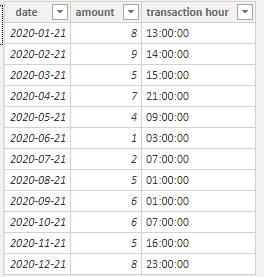
I create some data:
Here are the steps you can follow:
Create calendar.
Date = CALENDARAUTO()
Report transaction time as of Mar-21:
Create measure.
report transaction time as of Mar-21 =
var _select= SELECTEDVALUE('Date'[Date])
return
IF(_select=DATE(YEAR(_select),3,21),
CALCULATE(MAX('Table'[transaction hour]),FILTER(ALL('Table'),'Table'[date]=_select)),
CALCULATE(MAX('Table'[transaction hour]),FILTER(ALL('Table'),'Table'[date]=DATE(YEAR(_select),3,21))))
Growth vs. prior month:
1. Create measure.
This month =
var _date=SELECTEDVALUE('Date'[Date])
return
CALCULATE(SUM('Table'[amount]),FILTER(ALL('Table'),[date]>=DATE(YEAR(_date),MONTH(_date),1)&&[date]<=_date))Last month =
var _date=SELECTEDVALUE('Date'[Date])
return
CALCULATE(SUM('Table'[amount]),FILTER(ALL('Table'),[date]>=DATE(YEAR(_date),MONTH(_date)-1,1)&&[date]<=DATE(YEAR(_date),MONTH(_date)-1,DAY(_date))))
2. Using [Date] in the Date table as a slicer, put [This month] and [Last month] into the KPI.
Result:
Best Regards,
Liu Yang
If this post helps, then please consider Accept it as the solution to help the other members find it more quickly.
Hi @sbenzaquen ,
I create some data:
Here are the steps you can follow:
Create calendar.
Date = CALENDARAUTO()
Report transaction time as of Mar-21:
Create measure.
report transaction time as of Mar-21 =
var _select= SELECTEDVALUE('Date'[Date])
return
IF(_select=DATE(YEAR(_select),3,21),
CALCULATE(MAX('Table'[transaction hour]),FILTER(ALL('Table'),'Table'[date]=_select)),
CALCULATE(MAX('Table'[transaction hour]),FILTER(ALL('Table'),'Table'[date]=DATE(YEAR(_select),3,21))))
Growth vs. prior month:
1. Create measure.
This month =
var _date=SELECTEDVALUE('Date'[Date])
return
CALCULATE(SUM('Table'[amount]),FILTER(ALL('Table'),[date]>=DATE(YEAR(_date),MONTH(_date),1)&&[date]<=_date))Last month =
var _date=SELECTEDVALUE('Date'[Date])
return
CALCULATE(SUM('Table'[amount]),FILTER(ALL('Table'),[date]>=DATE(YEAR(_date),MONTH(_date)-1,1)&&[date]<=DATE(YEAR(_date),MONTH(_date)-1,DAY(_date))))
2. Using [Date] in the Date table as a slicer, put [This month] and [Last month] into the KPI.
Result:
Best Regards,
Liu Yang
If this post helps, then please consider Accept it as the solution to help the other members find it more quickly.
@sbenzaquen , You can create a new column like and use that to set this month or last month
Month Type = Switch( True(),
eomonth([Date],0) = eomonth(Today(),-1),"Last Month" ,
eomonth([Date],0)= eomonth(Today(),0),"This Month" ,
Format([Date],"MMM-YYYY")
)
you can use time intelligence for MOM
MTD Sales = CALCULATE(SUM(Sales[Sales Amount]),DATESMTD('Date'[Date]))
last MTD Sales = CALCULATE(SUM(Sales[Sales Amount]),DATESMTD(dateadd('Date'[Date],-1,MONTH)))
last month Sales = CALCULATE(SUM(Sales[Sales Amount]),previousmonth('Date'[Date]))
Power BI — Month on Month with or Without Time Intelligence
https://medium.com/@amitchandak.1978/power-bi-mtd-questions-time-intelligence-3-5-64b0b4a4090e
https://www.youtube.com/watch?v=6LUBbvcxtKA
Thank you, but this doesnt answer my question.
I know about DATEADD function
However I like to set a variable/paramenter so the dashboard provide information for a specific month.
For instance if the report is for Mar-21. I will see in the report transaction time as of Mar-21, growth vs. prior month....and other measures I calculated
If report is for Dec-21,I will see in the report transaction time as of Mar-21, growth vs. prior month....and other measures I calculated
The Power BI Data Visualization World Championships is back! Get ahead of the game and start preparing now!
| User | Count |
|---|---|
| 37 | |
| 36 | |
| 32 | |
| 31 | |
| 29 |
| User | Count |
|---|---|
| 132 | |
| 86 | |
| 85 | |
| 68 | |
| 64 |