Hi everyone,
I have a table which contains:
- Customer IDs
- A Timestamp date column for the end of each month
- A text column called “Trade Type”
- A text column which displays a Baseline Status
- A text column which displays a Revised Status
Each record starts with a baseline value of “Inactive”. If the trade type value changes in the following month, the Revised Status should be “Reactivated” in the current month, and then “Active” for future months. It does not matter if the Trade Type value changes again, it only has had to change once in a prior month for a record to be considered “Active” for future months.
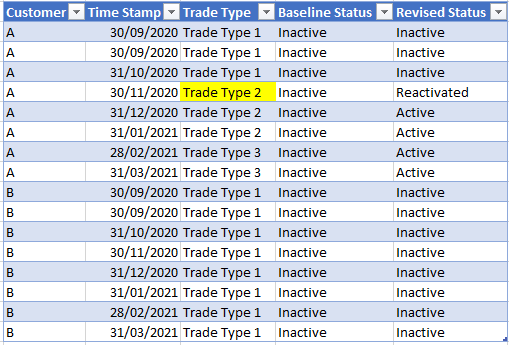
My solution is to use 5 calculated columns but I cannot work out how to set a record to display “Active” for future months. Could anyone advise a better solution?
1. Identify the trade type value in the previous month with a calculated column:
PreviousTT = CALCULATE (
    MAX ( Fact_MD_Current[Trade Type] ),
    FILTER (
        Fact_MD_Current,
        Fact_MD_Current[Customer] = EARLIER ( Fact_MD_Current[Customer] )
            && MONTH ( Fact_MD_Current[Record Timestamp] )
                = MONTH ( EDATE ( EARLIER ( Fact_MD_Current[Record Timestamp] ), -1 ) )
    )
)
2. Determine if the Current Trade Type value has changed by comparing Previous Trade Type with the Current Trade Type:
DifferentTT = IF(Fact_MD_Current[Record Timestamp]=MIN(Fact_MD_Current[Record Timestamp]),FALSE,Fact_MD_Current[Trade Type]<>Fact_MD_Current[PreviousTT])
3. Return “Reactivated” if the Baseline Status is "Inactive" and the DifferentTT column returns TRUE
Reactivated = IF(AND([MD Status Baseline]="Inactive"=TRUE,Fact_MD_Current[DifferentTT]),"Reactivated", "Not Reactivated"))
4. Check if in the Previous Month, the text value for the Reactivated column was “Reactivated”
Reactivated Previous Month = CALCULATE (

    MAX ( Fact_MD_Current[Reactivated] ),

    FILTER (

        Fact_MD_Current,

        Fact_MD_Current[Customer] = EARLIER ( Fact_MD_Current[Customer] )

            && MONTH ( Fact_MD_Current[Record Timestamp] )

                = MONTH ( EDATE ( EARLIER ( Fact_MD_Current[Record Timestamp] ), -1 ) )

    )

)
5. Create a calculated column to return “Reactivated” if the Reactivated calculated column = “Reactivated”. Otherwise, if the Reactivated Previous Month column returns "Reactivated", then return “Active”, otherwise return the Baseline Status.
Revised Status =
            IF([Reactivated]="Reactivated",
            "Reactivated",
            IF([Reactivated Previous Month]="Reactivated",
            "Active",
            Fact_MD_Current[MD Status Baseline]))
best regards,
AmiKhan


