Get Fabric certified for FREE!
Don't miss your chance to take the Fabric Data Engineer (DP-600) exam for FREE! Find out how by attending the DP-600 session on April 23rd (pacific time), live or on-demand.
Learn more- Power BI forums
- Get Help with Power BI
- Desktop
- Service
- Report Server
- Power Query
- Mobile Apps
- Developer
- DAX Commands and Tips
- Custom Visuals Development Discussion
- Health and Life Sciences
- Power BI Spanish forums
- Translated Spanish Desktop
- Training and Consulting
- Instructor Led Training
- Dashboard in a Day for Women, by Women
- Galleries
- Data Stories Gallery
- Themes Gallery
- Contests Gallery
- QuickViz Gallery
- Quick Measures Gallery
- Visual Calculations Gallery
- Notebook Gallery
- Translytical Task Flow Gallery
- TMDL Gallery
- R Script Showcase
- Webinars and Video Gallery
- Ideas
- Custom Visuals Ideas (read-only)
- Issues
- Issues
- Events
- Upcoming Events
Next up in the FabCon + SQLCon recap series: The roadmap for Microsoft SQL and Maximizing Developer experiences in Fabric. All sessions are available on-demand after the live show. Register now
- Power BI forums
- Forums
- Get Help with Power BI
- Desktop
- Set a conditional flag
- Subscribe to RSS Feed
- Mark Topic as New
- Mark Topic as Read
- Float this Topic for Current User
- Bookmark
- Subscribe
- Printer Friendly Page

- Mark as New
- Bookmark
- Subscribe
- Mute
- Subscribe to RSS Feed
- Permalink
- Report Inappropriate Content
Set a conditional flag
Hello!
I have a table where I have data on vehicle positions (vehicle id, time of sending their last position, longitude and latitude). I need to set up an active/inactive indicator (calculated column) to see if the vehicle has moved since the last position. The condition is that if there is a change (+/-) in latitude and/or longitude, the vehicle is defined as having been active, otherwise it is considered inactive. How can I write the condition ?
Greetings
Solved! Go to Solution.


- Mark as New
- Bookmark
- Subscribe
- Mute
- Subscribe to RSS Feed
- Permalink
- Report Inappropriate Content
I mean use the given dax formula to create a calculated column in your table.Is that what you are doing?
Home-->New column-->Paste the code there
The error is because you are using it as a measure.
- Mark as New
- Bookmark
- Subscribe
- Mute
- Subscribe to RSS Feed
- Permalink
- Report Inappropriate Content
Hey @Anonymous ,
How does your sample data look like?
- Mark as New
- Bookmark
- Subscribe
- Mute
- Subscribe to RSS Feed
- Permalink
- Report Inappropriate Content
Here is a sample of my data @PC2790
In this sample, the vehicles moved each time, so they are considered active.
But let’s imagine that the first line is duplicated with a different schedule, (the 04/07/2022 at 07:05:00 with the same longitude and latitude for example), the vehicle should therefore be marked as inactive for this newline
- Mark as New
- Bookmark
- Subscribe
- Mute
- Subscribe to RSS Feed
- Permalink
- Report Inappropriate Content
Hey @Anonymous ,
Is this what you are looking for?
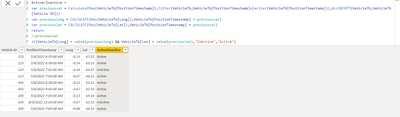
Active/Inactive =
var previousval = Calculate(Max(VehicleTb[PositionTimestamp]),Filter(VehicleTb,VehicleTb[PositionTimestamp]<Earlier(VehicleTb[PositionTimestamp])),ALLEXCEPT(VehicleTb,VehicleTb[Vehicle ID]))
var previouslong = CALCULATE(Max(VehicleTb[Long]),VehicleTb[PositionTimestamp] = previousval)
var previouslat = CALCULATE(Max(VehicleTb[Lat]),VehicleTb[PositionTimestamp] = previousval)
return
//previousval
if(VehicleTb[Long] = value(previouslong) && VehicleTb[Lat] = value(previouslat),"InActive","Active")- Mark as New
- Bookmark
- Subscribe
- Mute
- Subscribe to RSS Feed
- Permalink
- Report Inappropriate Content
This seems perfect.
However, I don’t understand why certain fields are greyed out and not taken into account. Can you help me debug the formula @PC2790 ?
- Mark as New
- Bookmark
- Subscribe
- Mute
- Subscribe to RSS Feed
- Permalink
- Report Inappropriate Content
This has to be a calculated column. Are you using the DAX in a calculated column?
- Mark as New
- Bookmark
- Subscribe
- Mute
- Subscribe to RSS Feed
- Permalink
- Report Inappropriate Content
No, these are not calculated columns,
The different fields work very well in the formula as you can see for positionTimestamp and the same for lontitude and longitude...
I don't unterstand the problem...
- Mark as New
- Bookmark
- Subscribe
- Mute
- Subscribe to RSS Feed
- Permalink
- Report Inappropriate Content
I mean use the given dax formula to create a calculated column in your table.Is that what you are doing?
Home-->New column-->Paste the code there
The error is because you are using it as a measure.
Helpful resources

New to Fabric Survey
If you have recently started exploring Fabric, we'd love to hear how it's going. Your feedback can help with product improvements.

Power BI DataViz World Championships - June 2026
A new Power BI DataViz World Championship is coming this June! Don't miss out on submitting your entry.

Power BI Community Update - March 2026
Check out the March 2026 Power BI update to learn about new features.

| User | Count |
|---|---|
| 44 | |
| 43 | |
| 38 | |
| 19 | |
| 15 |


| User | Count |
|---|---|
| 67 | |
| 66 | |
| 31 | |
| 28 | |
| 24 |


