Join us at FabCon Atlanta from March 16 - 20, 2026, for the ultimate Fabric, Power BI, AI and SQL community-led event. Save $200 with code FABCOMM.
Register now!Vote for your favorite vizzies from the Power BI Dataviz World Championship submissions. Vote now!
Hi
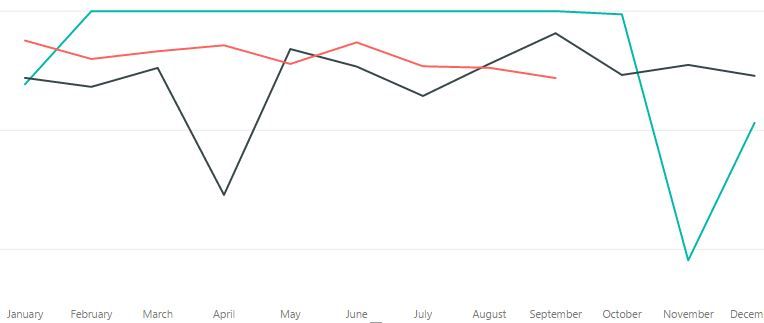
I have been using Power BI for a month or so now, but one thing I cannot get my head around is how to plit up a time based graph to show a different line for each year and overlay them.
I have an old historic data set which cover 2015, 2016 and 2017 in a single data table and my new data which is pulled in from sharepoint.
But the old data Only plots as one line, whereas I would like a line for each year.
I would love it to look more like this
Pleae help - i'm getting desperate!
Thanks
Chris
Solved! Go to Solution.
You may use Table.Combine or UNION Function to create a new table, then drag [Year] to Legend.
Vote for your favorite vizzies from the Power BI World Championship submissions!
If you love stickers, then you will definitely want to check out our Community Sticker Challenge!
Check out the January 2026 Power BI update to learn about new features.
| User | Count |
|---|---|
| 59 | |
| 54 | |
| 43 | |
| 20 | |
| 17 |
| User | Count |
|---|---|
| 123 | |
| 107 | |
| 44 | |
| 32 | |
| 24 |