Join us at FabCon Atlanta from March 16 - 20, 2026, for the ultimate Fabric, Power BI, AI and SQL community-led event. Save $200 with code FABCOMM.
Register now!Get Fabric certified for FREE! Don't miss your chance! Learn more
Hi
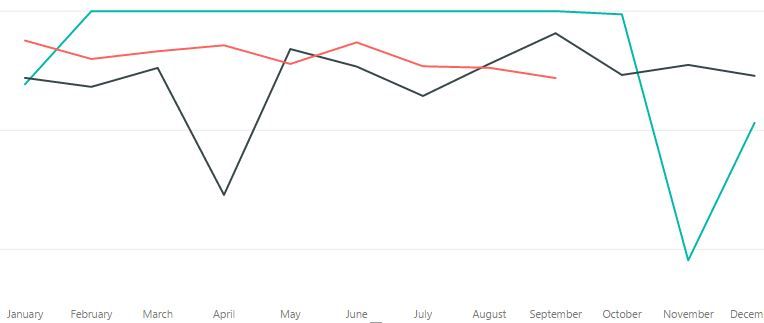
I have been using Power BI for a month or so now, but one thing I cannot get my head around is how to plit up a time based graph to show a different line for each year and overlay them.
I have an old historic data set which cover 2015, 2016 and 2017 in a single data table and my new data which is pulled in from sharepoint.
But the old data Only plots as one line, whereas I would like a line for each year.
I would love it to look more like this
Pleae help - i'm getting desperate!
Thanks
Chris
Solved! Go to Solution.
You may use Table.Combine or UNION Function to create a new table, then drag [Year] to Legend.
Share feedback directly with Fabric product managers, participate in targeted research studies and influence the Fabric roadmap.
Check out the January 2026 Power BI update to learn about new features.
| User | Count |
|---|---|
| 68 | |
| 59 | |
| 44 | |
| 20 | |
| 15 |
| User | Count |
|---|---|
| 104 | |
| 102 | |
| 37 | |
| 26 | |
| 26 |