Get certified for free when you join Fabric Data Days 2026 and dive into Fabric, Power BI, SQL, AI, and other essential data skills.
Join nowTry your skills in the Power BI Dataviz World Championship! Round one ends June 26. Join now
Hello,
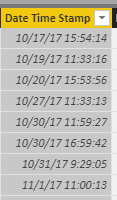
For my report, I am trying to separate a timestamp.
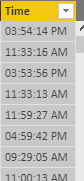
I used the following formula Time = FORMAT('Table'[Date Time Stamp], "hh:mm:ss AM/PM") for a new calculated column to produce the time in text format.
The issue is I need the time in Date/Time or Time format. When I try to convert it gives me the error Cannot convert value '' of type Text to type Date. I am not sure if there is some other way to convert the text format to time or if I am creating the calculated column the wrong way. Thank you for any input.
Solved! Go to Solution.
Hi @Anonymous,
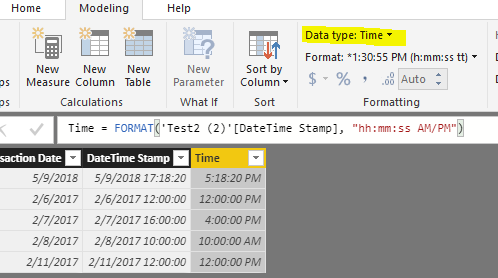
I tested the formula you provided, and it worked to set the data type of [Time] column from Text to Time without any error.
In your scenario, please try below formula. And set data type to "Time" under Modeling tab.
Time2 = TIMEVALUE(FORMAT('Table'[DateTime Stamp], "hh:mm:ss AM/PM"))
Regards,
Yuliana Gu
Hi @Anonymous,
I tested the formula you provided, and it worked to set the data type of [Time] column from Text to Time without any error.
In your scenario, please try below formula. And set data type to "Time" under Modeling tab.
Time2 = TIMEVALUE(FORMAT('Table'[DateTime Stamp], "hh:mm:ss AM/PM"))
Regards,
Yuliana Gu
Don't miss out on Data Days, June 15 through August 7. Learn Fabric, Power BI, SQL, AI and more.
Check out the May 2026 Power BI update to learn about new features.
| User | Count |
|---|---|
| 22 | |
| 22 | |
| 21 | |
| 20 | |
| 12 |
| User | Count |
|---|---|
| 58 | |
| 55 | |
| 41 | |
| 36 | |
| 35 |