Get certified for free when you join Fabric Data Days 2026 and dive into Fabric, Power BI, SQL, AI, and other essential data skills.
Join nowJuly 7 - July 17 | Round 2 of the Power BI Dataviz World Championships. Don't miss your chance! Learn more
Hello,
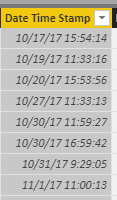
For my report, I am trying to separate a timestamp.
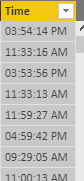
I used the following formula Time = FORMAT('Table'[Date Time Stamp], "hh:mm:ss AM/PM") for a new calculated column to produce the time in text format.
The issue is I need the time in Date/Time or Time format. When I try to convert it gives me the error Cannot convert value '' of type Text to type Date. I am not sure if there is some other way to convert the text format to time or if I am creating the calculated column the wrong way. Thank you for any input.
Solved! Go to Solution.
Hi @Anonymous,
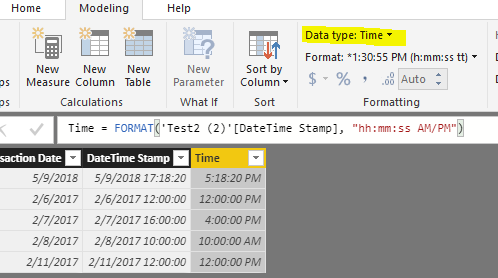
I tested the formula you provided, and it worked to set the data type of [Time] column from Text to Time without any error.
In your scenario, please try below formula. And set data type to "Time" under Modeling tab.
Time2 = TIMEVALUE(FORMAT('Table'[DateTime Stamp], "hh:mm:ss AM/PM"))
Regards,
Yuliana Gu
Hi @Anonymous,
I tested the formula you provided, and it worked to set the data type of [Time] column from Text to Time without any error.
In your scenario, please try below formula. And set data type to "Time" under Modeling tab.
Time2 = TIMEVALUE(FORMAT('Table'[DateTime Stamp], "hh:mm:ss AM/PM"))
Regards,
Yuliana Gu
Join us in Barcelona for FabCon and SQLCon, the Fabric, Power BI, SQL, and AI community event. Save €200 with code FABCMTY200.
Join Fabric Data Days 2026: 60 days of free live/on-demand sessions, challenges, study groups, and certification opportunities.
| User | Count |
|---|---|
| 23 | |
| 19 | |
| 18 | |
| 17 | |
| 13 |
| User | Count |
|---|---|
| 60 | |
| 52 | |
| 47 | |
| 40 | |
| 38 |