Don't miss your chance to take the Fabric Data Engineer (DP-600) exam for FREE! Find out how by watching the DP-600 session on-demand now through April 28th.
Learn moreJoin the FabCon + SQLCon recap series. Up next: Power BI, Real-Time Intelligence, IQ and AI, and Data Factory take center stage. All sessions are available on-demand after the live show. Register now
Solved! Go to Solution.
Hi @ferdinando86 ,
look at this.
Marcus Wegener works as Full Stack Power BI Engineer at BI or DIE.
His mission is clear: "Get the most out of data, with Power BI."
twitter - LinkedIn - YouTube - website - podcast - Power BI Tutorials
Thanks for the replys.
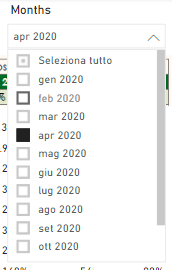
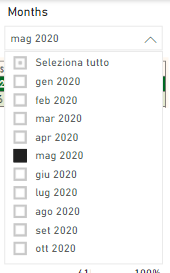
My problem is different. I'd like to automatically "select" current month in filter visual. An example below.
Current month:
Next month:
Is it possible?
Best Regards
Ferdinando
Hi @ferdinando86 ,
did you see my reply?
I create a column where i renamed the actual month as "Actual Month", to set the default filter on it.
Similar to this..
Marcus Wegener works as Full Stack Power BI Engineer at BI or DIE.
His mission is clear: "Get the most out of data, with Power BI."
twitter - LinkedIn - YouTube - website - podcast - Power BI Tutorials
Hi, @ferdinando86
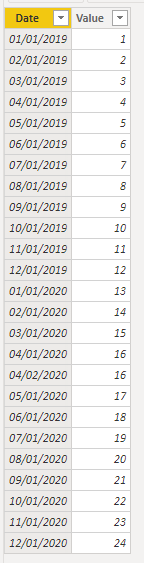
Based on your description, I created data to reproduce your scenario.
Table:
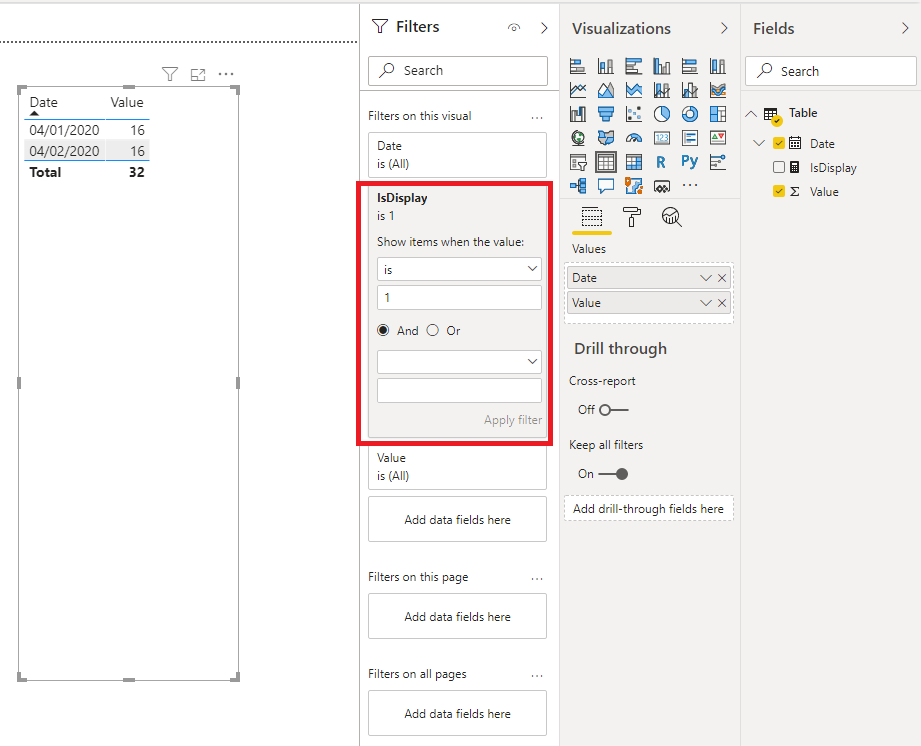
You may create a measure like below.
IsDisplay =
var _date = SELECTEDVALUE('Table'[Date])
return
IF(
MONTH(_date)=MONTH(TODAY())&&
YEAR(_date)=YEAR(TODAY()),
1,0
)
Then you need to put the measure in the visual level filter. Here is the result. Today is 4/9/2020. So the result displays the data on 4/1/2020 and 4/2/2020.
Best Regards
Allan
If this post helps, then please consider Accept it as the solution to help the other members find it more quickly.
Hi @ferdinando86 ,
look at this.
Marcus Wegener works as Full Stack Power BI Engineer at BI or DIE.
His mission is clear: "Get the most out of data, with Power BI."
twitter - LinkedIn - YouTube - website - podcast - Power BI Tutorials
Check out the April 2026 Power BI update to learn about new features.
If you have recently started exploring Fabric, we'd love to hear how it's going. Your feedback can help with product improvements.
A new Power BI DataViz World Championship is coming this June! Don't miss out on submitting your entry.
| User | Count |
|---|---|
| 48 | |
| 40 | |
| 38 | |
| 20 | |
| 17 |
| User | Count |
|---|---|
| 68 | |
| 65 | |
| 30 | |
| 26 | |
| 25 |