
cancel
Showing results for 
Search instead for 
Did you mean: 

We've captured the moments from FabCon & SQLCon that everyone is talking about, and we are bringing them to the community, live and on-demand. Starts on April 14th. Register now

Reply
pat_energetics
Advocate II
Advocate II

Selectcolumns function

Hi all,

Does anyone have any tips or examples on the use of the select columns function to create a new table.

I'm trying to create a new table based on an extract of an existing one and their is limited information on this function available.

Alternately, if there is another function that provides the same and allows the result to be viewed and edited in the table editor?

Cheers

1 ACCEPTED SOLUTION
Mi2n
Microsoft Employee
Microsoft Employee

You can better use the query editor window and Duplicate/Reference an existing query in order to create a table with data from another table.

View solution in original post

5 REPLIES 5
Anonymous
Not applicable

Hi @pat_energetics,


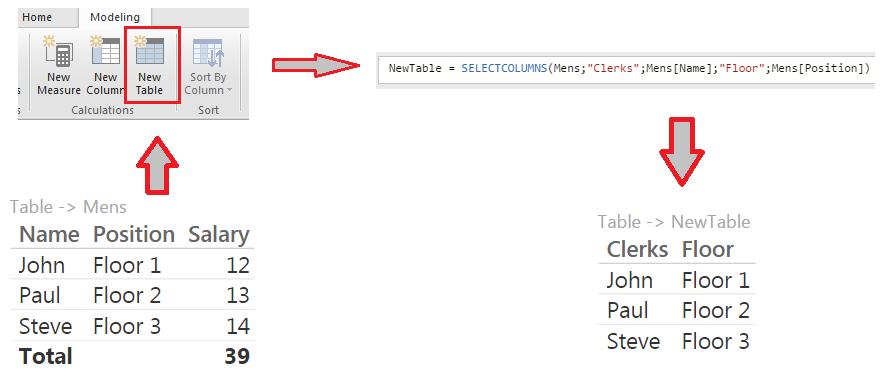
   if you want to extract some columns from a table to put them in another table you can use the SELECTCOLUMNS() function.

Here the neededarguments for the function:


selectColumnsFunction (2).png


and an example..


selectColumnsFunction (1).png


..let me know if it works.


#I'M Not An Expert#

I am getting an error message that "The expression refers to multiple columns. Multiple columns can not be converted to a scalar value". Isnt the point of the command to select multiple columns?

Thanks B129,


Although that works the suggestion given by mi2n seems more appropriate for ourapplication. By going back to the source query and duplicating what we need upstream, it seems the resulting table is much easier to work with.

Mi2n
Microsoft Employee
Microsoft Employee

You can better use the query editor window and Duplicate/Reference an existing query in order to create a table with data from another table.

Thanks Mi2n


The suggestion given seems more appropriate for ourapplication. By going back to the source query and duplicating what we need upstream, it seems the resulting table is much easier to work with.

Helpful resources

Announcements
New to Fabric survey Carousel

New to Fabric Survey

If you have recently started exploring Fabric, we'd love to hear how it's going. Your feedback can help with product improvements.

Power BI DataViz World Championships carousel

Power BI DataViz World Championships - June 2026

A new Power BI DataViz World Championship is coming this June! Don't miss out on submitting your entry.

Join our Fabric User Panel

Join our Fabric User Panel

Share feedback directly with Fabric product managers, participate in targeted research studies and influence the Fabric roadmap.

March Power BI Update Carousel

Power BI Community Update - March 2026

Check out the March 2026 Power BI update to learn about new features.