
Join us at FabCon Atlanta from March 16 - 20, 2026, for the ultimate Fabric, Power BI, AI and SQL community-led event. Save $200 with code FABCOMM.
Register now!The Power BI Data Visualization World Championships is back! Get ahead of the game and start preparing now! Learn more
Hi all,
Does anyone have any tips or examples on the use of the select columns function to create a new table.
I'm trying to create a new table based on an extract of an existing one and their is limited information on this function available.
Alternately, if there is another function that provides the same and allows the result to be viewed and edited in the table editor?
Cheers
Solved! Go to Solution.
You can better use the query editor window and Duplicate/Reference an existing query in order to create a table with data from another table.
Hi @pat_energetics,
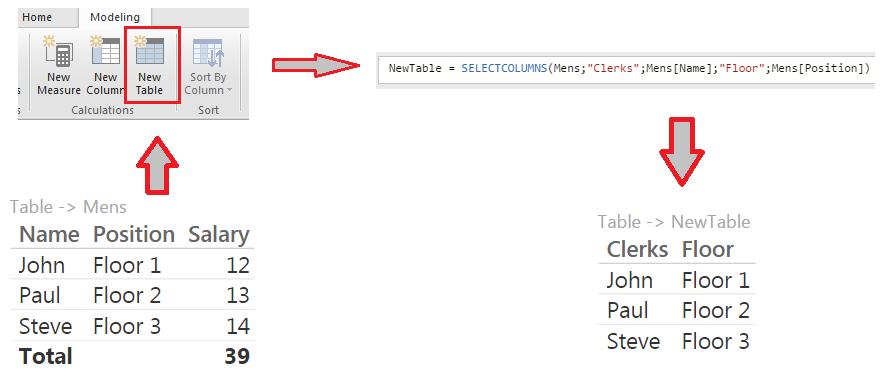
if you want to extract some columns from a table to put them in another table you can use the SELECTCOLUMNS() function.
Here the neededarguments for the function:
and an example..
..let me know if it works.
#I'M Not An Expert#
Thanks B129,
Although that works the suggestion given by mi2n seems more appropriate for ourapplication. By going back to the source query and duplicating what we need upstream, it seems the resulting table is much easier to work with.
You can better use the query editor window and Duplicate/Reference an existing query in order to create a table with data from another table.
Thanks Mi2n
The suggestion given seems more appropriate for ourapplication. By going back to the source query and duplicating what we need upstream, it seems the resulting table is much easier to work with.
The Power BI Data Visualization World Championships is back! Get ahead of the game and start preparing now!
Check out the November 2025 Power BI update to learn about new features.
| User | Count |
|---|---|
| 59 | |
| 43 | |
| 42 | |
| 23 | |
| 17 |
| User | Count |
|---|---|
| 190 | |
| 122 | |
| 96 | |
| 66 | |
| 46 |