
Get certified for free when you join Fabric Data Days 2026 and dive into Fabric, Power BI, SQL, AI, and other essential data skills.
Join nowData Days is here! Join us now for 60+ days of learning, challenges, and connection. Learn more
Dear, how are you?
Along with saying hello, I would like to ask this express question that would help me a lot when doing Column Override in Power Query.
The issue is: all the dates I have in column format, I want to convert them into rows applying the previous function, but first, these columns I have to select.
There is a quick way to select these columns (in my base there are 120 that correspond to 120 months in 10 years) instead of having to select column by column by left clicking on each header with the risk that the pointer goes off the side, and I have to repeat the process of doing again 120 clicks to select 120 columns.
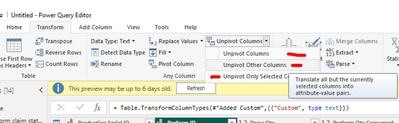
Attached screenshot to illustrate example:
In advance, thank you very much!
Best regards
That option is good, the problem is that to apply a pivot, I have to select several columns (about 32) ... In reality, the base is gigantic.
In any case, the proposal is good because it is preferable to select 32 columns instead of 120.
I understand your pain and we should really think to automate as much as possible.
I can try to help you out with the example, but I think there are several online links availble. If it does not help, then I will provide a sample.
https://goodly.co.in/dynamic-column-selection-power-query/
https://goodly.co.in/dynamic-unpivoting-power-query/
Hope it helps.
Can below option help you avoiding selecting 120 column, and select remaining few columns other than those!
Hope it helps.
@Syndicate_Admin , Based on what I can see in the sample. You first need to unpivot the column. Then split it into multiple columns and then change the type
Unpivot Data(Power Query): https://youtu.be/2HjkBtxSM0g
Power Query Split Column , Split Column By Delimiter: https://youtu.be/FyO9Vmhcfag
Don't miss out on Data Days, June 15 through August 7. Learn Fabric, Power BI, SQL, AI and more.
Check out the May 2026 Power BI update to learn about new features.
| User | Count |
|---|---|
| 23 | |
| 23 | |
| 21 | |
| 20 | |
| 15 |
| User | Count |
|---|---|
| 58 | |
| 53 | |
| 42 | |
| 30 | |
| 24 |