cancel
Showing results for 
Search instead for 
Did you mean: 

Data Days is here! Join us now for 60+ days of learning, challenges, and connection. Learn more

Reply
LRFeltz
Advocate III
Advocate III

Security parameter

Hello guys,


I'm starting in Power BI (desktop) and would like to help.


I saw that we could create security levels through groups and allocate users to these groups. But I would like to define each user parameter within a table ... Example : I created a security table which has the user field and region ... After I create the group would like to seek the parameters in this table ...


Example : [Region] = here to get the user accessing this and get the region that he should see in the table


Does anyone know how we can do this ?

Thank you,

LR Feltz

1 ACCEPTED SOLUTION
ankitpatira
Community Champion
Community Champion

@LRFeltz

As mentioned you can make use of Username() function of dad to be able to do this. However make sure in your user table you have email address of a user as username() in power bi desktop will return domain\username while in power bi service it will return email address of logged in user.

View solution in original post

5 REPLIES 5
Baskar
Resident Rockstar
Resident Rockstar

Hi LRfeltz,


1. Here we cant set like Tableau, this is first thing.

2. second the security level totally based and depending on cloud.

3. In server Dataset level u could find the option like security click that one there u could see the Rules  tab, under this u could right your DAX query.


Note:

Username() = domain/userloginname

Thanks for the help guys !
I will apply the solutions suggested by you.
thank you!

walnei
Helper III
Helper III

Hello Friend.

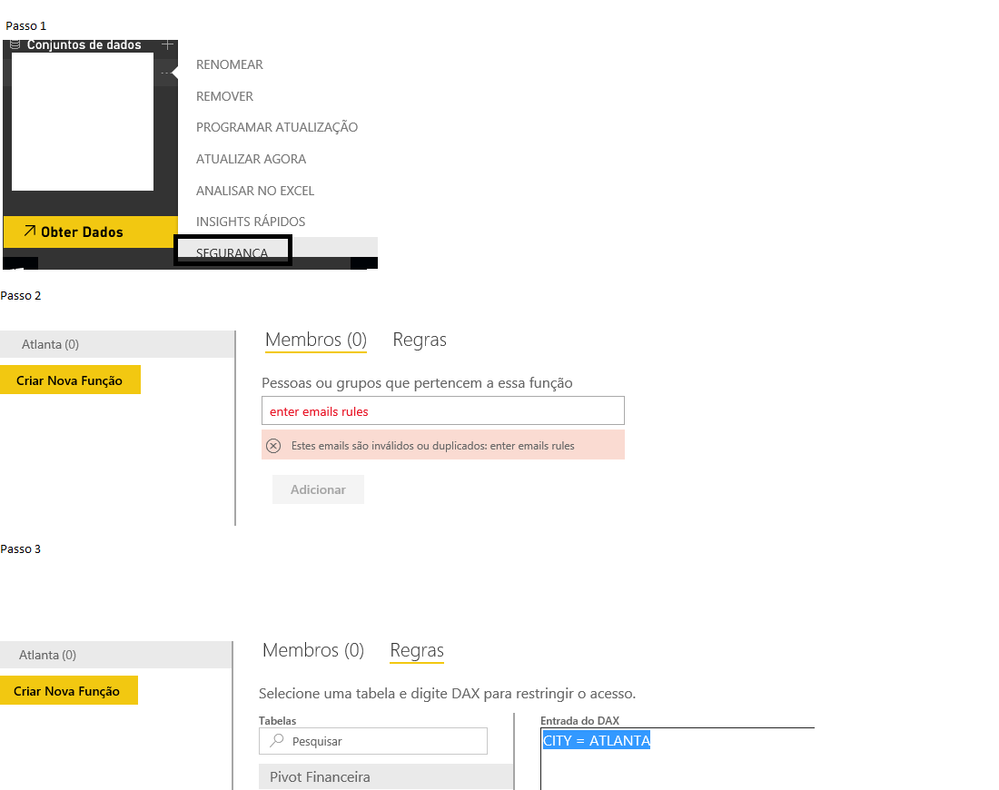
To make data segmentation , follow the steps image .

Comments:

1 - the RLS rules only work on dashboards and reports provided by the content package .

2 - The rules do not work for the administrator

3 - The rules do not work on your desktop or in groups

4 - if you publish a new pbi file on top of this current , the rules will be deleted. Update preference data using gateway.

I am the disposal for further information.

#PowerBI Seeking Leadership

Brazilian hug

IF YOU ARE RIGHT, MARK AS ANSWER TO GUIDE TO OTHER

IMAGEM RLS.png


ankitpatira
Community Champion
Community Champion

@LRFeltz

As mentioned you can make use of Username() function of dad to be able to do this. However make sure in your user table you have email address of a user as username() in power bi desktop will return domain\username while in power bi service it will return email address of logged in user.
samdthompson
Memorable Member
Memorable Member

i use a table called region myself for this. two solutions:


1. use the RSL in service version (click elipsis on dataset then security). This is super easy but the RSL is still beta and will be overridden on data refresh.

2. use DAX function username() as a filter. This works if your table contains all your users ID's assigned to the correct regionalities. Then just join region[reagion_name] to fact[region_name] (or whatever it might be).

// if this is a solution please mark as such. Kudos always appreciated.

Helpful resources

Announcements
Fabric Data Days is here Carousel

Fabric Data Days 2026

Don't miss out on Data Days, June 15 through August 7. Learn Fabric, Power BI, SQL, AI and more.

May Power BI Update Carousel

Power BI Monthly Update - May 2026

Check out the May 2026 Power BI update to learn about new features.

Power BI DataViz World Championships carousel

Power BI DataViz World Championships - June 2026

A new Power BI DataViz World Championship is coming this June! Don't miss out on submitting your entry.