Join us at FabCon Atlanta from March 16 - 20, 2026, for the ultimate Fabric, Power BI, AI and SQL community-led event. Save $200 with code FABCOMM.
Register now!Vote for your favorite vizzies from the Power BI Dataviz World Championship submissions. Vote now!
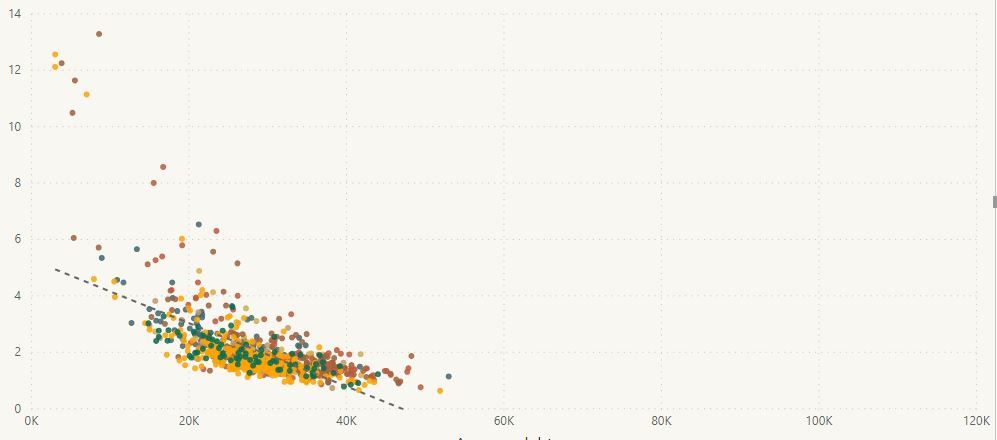
I am adding a trend line to a scatterplot. As you can see in the attached screen shot, the line does not go through the data. I cannot figure out what is going on here. In fact, two of my colleagues have looked at this and we're all stumped.
Things we've tried:
The line does respond to changes in filters: if we turn filters/slicers on and off, the line will shift, but it never actually goes through the displayed data.
Are there any other things that we should look at?
Edit/Update:
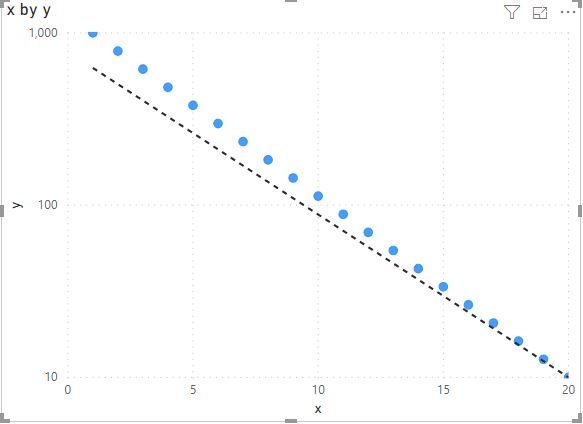
The y-axis is on a log scale. If I change the scale to linear, the line works properly. So, This appears to be a bug. When the y-axis is changed to log, the trend line continues to be on a linear scale. Is there any way to fix this?
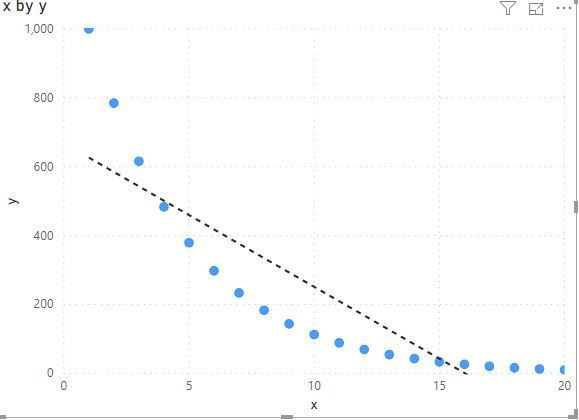
Screen shot of y-axis on a linear scale (same data) added for comparison.
Log scale:
Linear scale:
Hi! I'm facing the exactly same issue here. Is there any workaround except creating a custom visual by myself?
Hi @dtan ,
Can you please share some sample data for test? It is hard to test without any sample data.
How to Get Your Question Answered Quickly
Notice: please do mask on sensitive data before share
Regards,
Xiaoxin Sheng
Sure. Here is a table of log-linear data that I created with python:
| x | y |
| 1 | 1000 |
| 2 | 784.76 |
| 3 | 615.8482 |
| 4 | 483.293 |
| 5 | 379.269 |
| 6 | 297.6351 |
| 7 | 233.5721 |
| 8 | 183.2981 |
| 9 | 143.845 |
| 10 | 112.8838 |
| 11 | 88.58668 |
| 12 | 69.51928 |
| 13 | 54.55595 |
| 14 | 42.81332 |
| 15 | 33.59818 |
| 16 | 26.36651 |
| 17 | 20.69138 |
| 18 | 16.23777 |
| 19 | 12.74275 |
| 20 | 10 |
When I plot this in PowerBI with y on a linear scale, the trend line is correct. When I plot with y on a log scale, the trend line no longer goes through the data.
Linear scale:
Log scale:
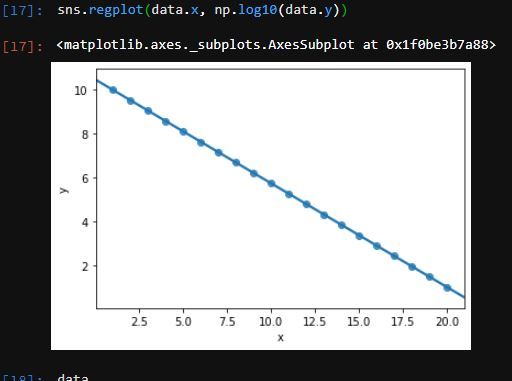
The data were created so that the relationship is perfectly log-linear, and the line should go exactly through the datapoints. Here is a plot I made with the data in python with the y data plotted as log10(y):
Hi @dtan ,
I can reproduce your scenario.
I build a table from your sample data and add a calculated column based y column, trend line works well as the result that your python code generated.
logY = LOG10([y])
Regards,
Xiaoxin Sheng
Thanks -- unfortunately with this fix (as in my Python demo) is that the y-axis is now in log-units.
The ideal scenario we're trying for is to have the y-axis in their original units (e.g., 1, 10, 100), but with their spacing on a log scale, and the trend line reflecting the linearized relationship *after* the log transform.
I can't find a clear way to plot the log-transformed datapoints with the values on the y-axis in the original scale, but with the trend line showing the now linearized relationship in PowerBI.
In scripting-based plotting tools you can generally apply values to the y-axis for display purposes (e.g., have 1, 10, and 100, equispaced along the y-axis), while plotting the log-transformed data with the appropriate trendline. Is this possible in PowerBI? Is there a hacky workaround that can be done to display the y-axis in the original units, while plotting the log transformed data with trend line?
More generally, it seems less than ideal to have a trendline *not* go through data after the axis is changed to a log scale (independent of my particular problem -- this is a platform-level issue).
The Power BI Data Visualization World Championships is back! It's time to submit your entry.
If you love stickers, then you will definitely want to check out our Community Sticker Challenge!
Check out the January 2026 Power BI update to learn about new features.
| User | Count |
|---|---|
| 70 | |
| 55 | |
| 38 | |
| 28 | |
| 22 |
| User | Count |
|---|---|
| 133 | |
| 119 | |
| 54 | |
| 37 | |
| 31 |