cancel
Showing results for 
Search instead for 
Did you mean: 

The Power BI Data Visualization World Championships is back! Get ahead of the game and start preparing now! Learn more

Reply
Anonymous
Not applicable

Scatterplot line graph plotting issues

Hi All,

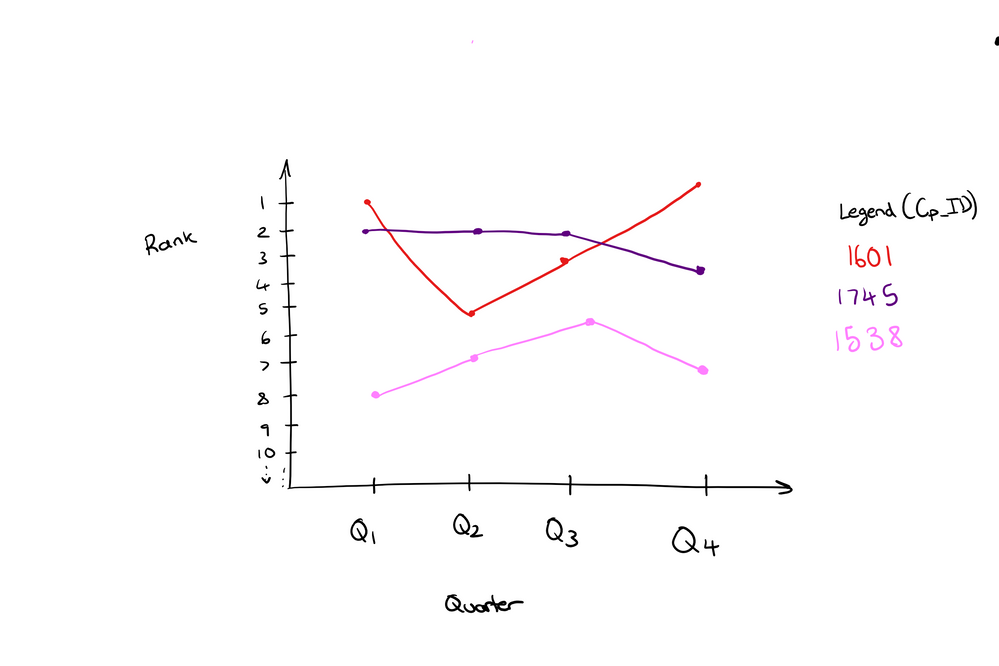
I am trying to plot the rank of a company over the past 4 quarters. 

Y-axis: Ranking

X-axis: Quarters

Legend: Comapny (One line for each company)


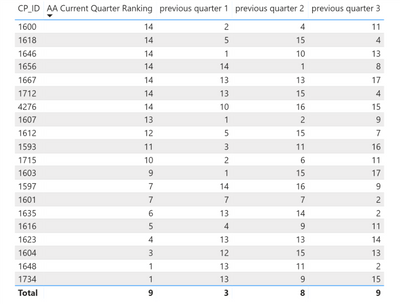
My data is shown below.


Data to plot.png


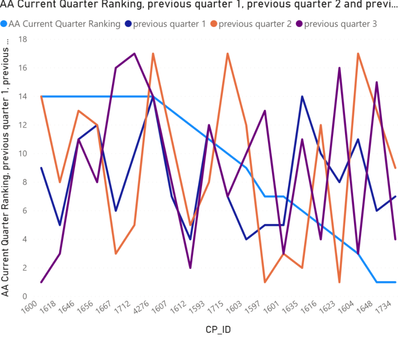
I tried using scatter charts and line charts but CP ID goes to the x-axis (see bwlow) and I cant move the values around in the fields page. Any ideas on how to solve this? Thqanks in advance for all the help!


scatter graph.png


1 ACCEPTED SOLUTION
Anonymous
Not applicable

Hi @Anonymous ,

It is hard to calculate across multiple columns, I'd like to suggest you to 'unpivot columns' on your quarter fields(at query editor side), then you can write a formula to rolling calculate over these quarter ranges. (id to axis, attribute as legend, measure as value)

Unpivot columns (Power Query) 

Regards,

Xiaoxin Sheng

View solution in original post

6 REPLIES 6
Anonymous
Not applicable

Hi @Anonymous ,

It is hard to calculate across multiple columns, I'd like to suggest you to 'unpivot columns' on your quarter fields(at query editor side), then you can write a formula to rolling calculate over these quarter ranges. (id to axis, attribute as legend, measure as value)

Unpivot columns (Power Query) 

Regards,

Xiaoxin Sheng

Anonymous
Not applicable

Hi @Anonymous ,


Thank you for your response. Just a quick follow up question, is it possible to unpivot tables while they are in a visual? My table is a visual on a page and I used measures to calculate the rankings.


Regards,

Nader

Anonymous
Not applicable

HI @Anonymous ,

You can use the matrix visual to expand unpivoted fields.(id to rows, attribute to columns, measure as value)

BTW, you can also use duplicate query feature to create a backup table to do calculation with the original table structure.

Regards,

Xiaoxin Sheng

Anonymous
Not applicable

Any ideas on this?@Washivale @amitchandak 

Hi @Anonymous ,


not sure what you are looking for on this, however to better compare numbers by Quarters use Line chart and change formatting as per attached screenshot.


let me know if it helps.

Regards,

Washivale

image.png

Anonymous
Not applicable

Hi Washivale, 

Thanks for your reply.


I sketched the graph I am trying to make below.


The graph in my original post is the outcome of using the line graph, and I am unable to make CP_ID the legend and plot how the rank of each ID changes over the 4 periods.


 I hope this explains what I am trying to achieve.

rank graph.png

Helpful resources

Announcements
Power BI DataViz World Championships

Power BI Dataviz World Championships

The Power BI Data Visualization World Championships is back! Get ahead of the game and start preparing now!

December 2025 Power BI Update Carousel

Power BI Monthly Update - December 2025

Check out the December 2025 Power BI Holiday Recap!

FabCon Atlanta 2026 carousel

FabCon Atlanta 2026

Join us at FabCon Atlanta, March 16-20, for the ultimate Fabric, Power BI, AI and SQL community-led event. Save $200 with code FABCOMM.