Don't miss your chance to take the Fabric Data Engineer (DP-700) exam on us!
Learn moreWe've captured the moments from FabCon & SQLCon that everyone is talking about, and we are bringing them to the community, live and on-demand. Starts on April 14th. Register now
Hi,
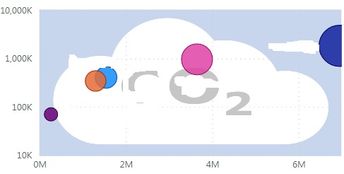
See picture below.
I have uplaod a scatter chart, however, plot area only showed half of the blue bubble. It is worked in Power BI desktop app.
Whats is wrong with this.
Thanks
In the Range setting of Y axis, instead of Auto, set some values to show all the markers.
It showing all bubbles perfectly in Power BI app design model, but not working in web view moedel (see picture above).
After set value to instead of Auto, it is fine. However, it is all squzzed in corner ox X and Y axises, after fitlers applied with small number of ORG.
Thanks
Check in different browser.
Or Play with scale. Is linear scale is suitable for your data?
Usually, appearance of desktop version remains same in service.
Yes, I have played with scale, log or linear .....
However, it is fine in Power BI desktop design model, didn't work for web browser (Edge or Chrome).
I will dig this out.
Thanks
Hi, @fallrains
This is really strange, does it have something to do with your page settings?
If the problem persists, it is recommended to create a support ticket to let MS engineers look into the issue on your side. https://powerbi.microsoft.com/en-us/support/
Best Regards,
Community Support Team _ Eason
Can you please add a sample data table to replicate the problem?
Hi Mahenkj2,
See table below.
| ORG | Total Kms Saved | Total Carbon emission avoided(kg) |
| A | 1540040 | 408000 |
| B | 264123 | 69990 |
If you have recently started exploring Fabric, we'd love to hear how it's going. Your feedback can help with product improvements.
A new Power BI DataViz World Championship is coming this June! Don't miss out on submitting your entry.
Share feedback directly with Fabric product managers, participate in targeted research studies and influence the Fabric roadmap.
| User | Count |
|---|---|
| 55 | |
| 40 | |
| 35 | |
| 19 | |
| 18 |
| User | Count |
|---|---|
| 71 | |
| 70 | |
| 38 | |
| 35 | |
| 23 |