
Join us at FabCon Atlanta from March 16 - 20, 2026, for the ultimate Fabric, Power BI, AI and SQL community-led event. Save $200 with code FABCOMM.
Register now!The Power BI Data Visualization World Championships is back! Get ahead of the game and start preparing now! Learn more
Hello,
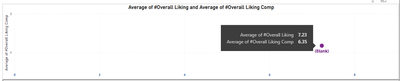
Here I have pasted the Excel Scatter Plot
Similarly can i Create the same kind of visual in Power BI with average of two different fiels in X-axis,
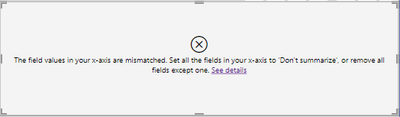
I tried creating this but getting this error
Is there any other way or any plot to achieve same as the Excel one I pasted!!
Any Suggestions on this
Thanks in Advance!!!
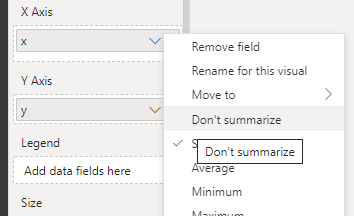
@Kishore_Sr4 According to the error, you need to set "don't summarise" for X . If it doesn't work then create a new index column, and drag it to the value. Both ways work.
Hi @Kishore_Sr4 ,
I would need more details on what you are trying to achieve in Power BI:
https://community.powerbi.com/t5/Desktop/How-to-Get-Your-Question-Answered-Quickly/m-p/1447523
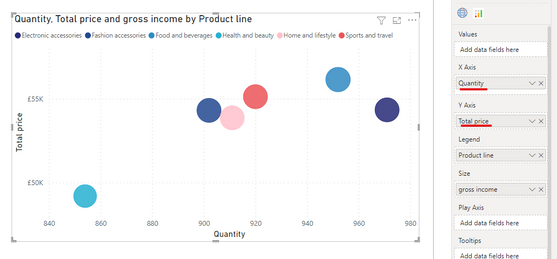
You can definitely create a scatter chart in Power BI. Something shown below:
Hi @Pragati11
I am trying to achieve what I have in my Excel plot, that is average value of two different fields has to be shown in same axis
In Power BI I have tried to put two different fields in X-axis but it is arriving at one single Marker point since I want to differentiate two different values
The Power BI Data Visualization World Championships is back! Get ahead of the game and start preparing now!
| User | Count |
|---|---|
| 37 | |
| 36 | |
| 33 | |
| 33 | |
| 29 |
| User | Count |
|---|---|
| 132 | |
| 86 | |
| 85 | |
| 68 | |
| 64 |