
cancel
Showing results for 
Search instead for 
Did you mean: 

Level up your Power BI skills this month - build one visual each week and tell better stories with data! Get started

Reply
Kishore_Sr4
Frequent Visitor

Scatter Plot

Hello,

 Here I have pasted the Excel Scatter Plot 

Kishore_Sr4_0-1660730697464.png

Similarly can i Create the same kind of visual in Power BI with average of two different fiels in X-axis,


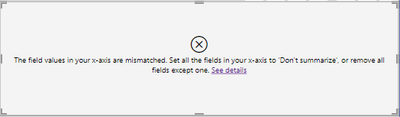
I tried creating this but getting this error

Kishore_Sr4_1-1660730883019.png

Is there any other way or any plot to achieve same as the Excel one I pasted!!


Any Suggestions on this


Thanks in Advance!!!


4 REPLIES 4
RayWu
Memorable Member
Memorable Member

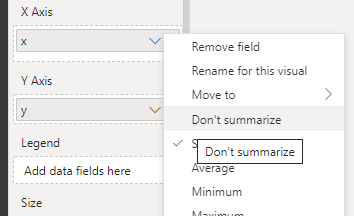
@Kishore_Sr4 According to the error, you need to set "don't summarise" for X . If it doesn't work then create a new index column, and drag it to the value. Both ways work.

ray_ux_0-1660735118084.png


Pragati11
Super User
Super User

Hi @Kishore_Sr4 ,


I would need more details on what you are trying to achieve in Power BI:

https://community.powerbi.com/t5/Desktop/How-to-Get-Your-Question-Answered-Quickly/m-p/1447523

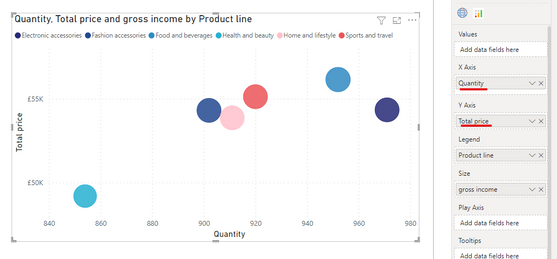
You can definitely create a scatter chart in Power BI. Something shown below:

Pragati11_0-1660733934391.png


Best Regards,

Pragati Jain


MVP logo


LinkedIn | Twitter | Blog YouTube 

Did I answer your question? Mark my post as a solution! This will help others on the forum!

Appreciate your Kudos!!

Proud to be a Super User!!

Hi @Pragati11 

I am trying to achieve what I have in my Excel plot, that is average value of two different fields has to be shown in same axis

Kishore_Sr4_1-1660798980837.png


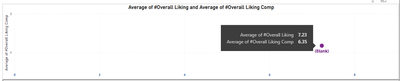
In Power BI I have tried to put two different fields in X-axis but it is arriving at one single Marker point since I want to differentiate two different values

Kishore_Sr4_0-1660798904320.png


HI @Kishore_Sr4 ,


Can you share some sample data here so I can try at my end?


Best Regards,

Pragati Jain


MVP logo


LinkedIn | Twitter | Blog YouTube 

Did I answer your question? Mark my post as a solution! This will help others on the forum!

Appreciate your Kudos!!

Proud to be a Super User!!

Helpful resources

Announcements
April Power BI Update Carousel

Power BI Monthly Update - April 2026

Check out the April 2026 Power BI update to learn about new features.

Fabric SQL PBI Data Days

Data Days 2026 coming soon!

Sign up to receive a private message when registration opens and key events begin.

New to Fabric survey Carousel

New to Fabric Survey

If you have recently started exploring Fabric, we'd love to hear how it's going. Your feedback can help with product improvements.

Power BI DataViz World Championships carousel

Power BI DataViz World Championships - June 2026

A new Power BI DataViz World Championship is coming this June! Don't miss out on submitting your entry.