
Get certified for free when you join Fabric Data Days 2026 and dive into Fabric, Power BI, SQL, AI, and other essential data skills.
Join nowTry your skills in the Power BI Dataviz World Championship! Round one ends June 26. Join now
Hello,
Here I have pasted the Excel Scatter Plot
Similarly can i Create the same kind of visual in Power BI with average of two different fiels in X-axis,
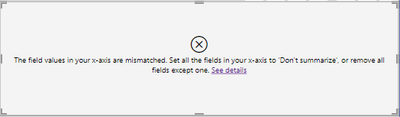
I tried creating this but getting this error
Is there any other way or any plot to achieve same as the Excel one I pasted!!
Any Suggestions on this
Thanks in Advance!!!
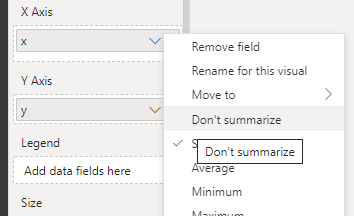
@Kishore_Sr4 According to the error, you need to set "don't summarise" for X . If it doesn't work then create a new index column, and drag it to the value. Both ways work.
Hi @Kishore_Sr4 ,
I would need more details on what you are trying to achieve in Power BI:
https://community.powerbi.com/t5/Desktop/How-to-Get-Your-Question-Answered-Quickly/m-p/1447523
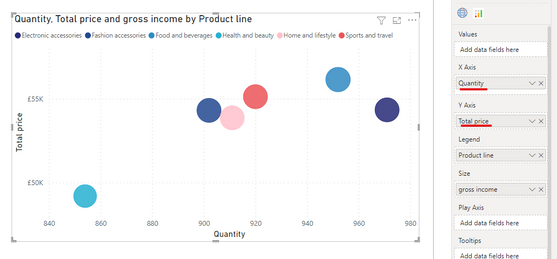
You can definitely create a scatter chart in Power BI. Something shown below:
Hi @Pragati11
I am trying to achieve what I have in my Excel plot, that is average value of two different fields has to be shown in same axis
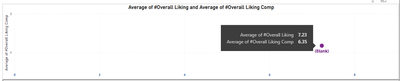
In Power BI I have tried to put two different fields in X-axis but it is arriving at one single Marker point since I want to differentiate two different values
Don't miss out on Data Days, June 15 through August 7. Learn Fabric, Power BI, SQL, AI and more.
Check out the May 2026 Power BI update to learn about new features.
| User | Count |
|---|---|
| 21 | |
| 21 | |
| 21 | |
| 19 | |
| 11 |
| User | Count |
|---|---|
| 59 | |
| 53 | |
| 40 | |
| 31 | |
| 26 |