cancel
Showing results for 
Search instead for 
Did you mean: 

The Power BI Data Visualization World Championships is back! Get ahead of the game and start preparing now! Learn more

Reply
Renjith
Helper II
Helper II

Scatter Plot reference Line

Hi 

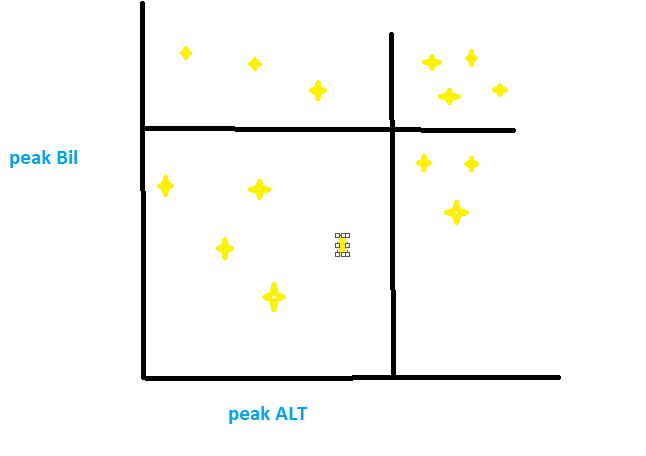
 I want a scatter plot with refrence range lines on both axis X & Y. See the attachment. 


is it possible please help on thisScatter with reference rangeScatter with reference range

1 ACCEPTED SOLUTION

Thank you it works fine


@sanjeev803 wrote:

Yes, you can do that from Analytics option given in Visulization pane (next to formatting pane) and add X- axis and Y-axis constant lines.


Cheers!

Sanj


@sanjeev803 wrote:

Yes, you can do that from Analytics option given in Visulization pane (next to formatting pane) and add X- axis and Y-axis constant lines.


Cheers!

Sanj


View solution in original post

4 REPLIES 4
Renjith
Helper II
Helper II

Hi 


Is there any way to set the X & Y axis reference as a column value instaed of manual entry


@Renjith wrote:

Hi 

 I want a scatter plot with refrence range lines on both axis X & Y. See the attachment. 


is it possible please help on thisScatter with reference rangeScatter with reference range


@Renjith wrote:

Hi 

 I want a scatter plot with refrence range lines on both axis X & Y. See the attachment. 


is it possible please help on thisScatter with reference rangeScatter with reference range


sanjeev803
Helper I
Helper I

Yes, you can do that from Analytics option given in Visulization pane (next to formatting pane) and add X- axis and Y-axis constant lines.


Cheers!

Sanj

Anonymous
Not applicable

I have some doubt regarding the same concept. Can we add dynamic refrence line to scatter plot which will vary as per the data points in x axis. 

Thank you it works fine


@sanjeev803 wrote:

Yes, you can do that from Analytics option given in Visulization pane (next to formatting pane) and add X- axis and Y-axis constant lines.


Cheers!

Sanj


@sanjeev803 wrote:

Yes, you can do that from Analytics option given in Visulization pane (next to formatting pane) and add X- axis and Y-axis constant lines.


Cheers!

Sanj


Helpful resources

Announcements
Power BI DataViz World Championships

Power BI Dataviz World Championships

The Power BI Data Visualization World Championships is back! Get ahead of the game and start preparing now!

December 2025 Power BI Update Carousel

Power BI Monthly Update - December 2025

Check out the December 2025 Power BI Holiday Recap!

FabCon Atlanta 2026 carousel

FabCon Atlanta 2026

Join us at FabCon Atlanta, March 16-20, for the ultimate Fabric, Power BI, AI and SQL community-led event. Save $200 with code FABCOMM.

Top Solution Authors