cancel
Showing results for 
Search instead for 
Did you mean: 

July 7 - July 17 | Round 2 of the Power BI Dataviz World Championships. Don't miss your chance! Learn more

Reply
Renjith
Helper II
Helper II

Scatter Plot reference Line

Hi 

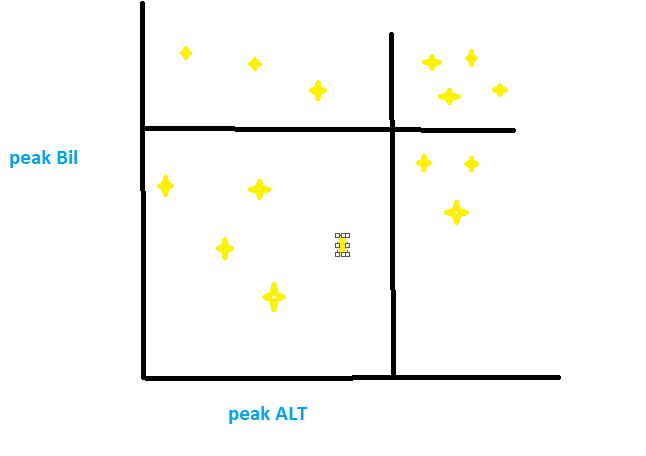
 I want a scatter plot with refrence range lines on both axis X & Y. See the attachment. 


is it possible please help on thisScatter with reference rangeScatter with reference range

1 ACCEPTED SOLUTION

Thank you it works fine


@sanjeev803 wrote:

Yes, you can do that from Analytics option given in Visulization pane (next to formatting pane) and add X- axis and Y-axis constant lines.


Cheers!

Sanj


@sanjeev803 wrote:

Yes, you can do that from Analytics option given in Visulization pane (next to formatting pane) and add X- axis and Y-axis constant lines.


Cheers!

Sanj


View solution in original post

4 REPLIES 4
Renjith
Helper II
Helper II

Hi 


Is there any way to set the X & Y axis reference as a column value instaed of manual entry


@Renjith wrote:

Hi 

 I want a scatter plot with refrence range lines on both axis X & Y. See the attachment. 


is it possible please help on thisScatter with reference rangeScatter with reference range


@Renjith wrote:

Hi 

 I want a scatter plot with refrence range lines on both axis X & Y. See the attachment. 


is it possible please help on thisScatter with reference rangeScatter with reference range


sanjeev803
Helper I
Helper I

Yes, you can do that from Analytics option given in Visulization pane (next to formatting pane) and add X- axis and Y-axis constant lines.


Cheers!

Sanj

Anonymous
Not applicable

I have some doubt regarding the same concept. Can we add dynamic refrence line to scatter plot which will vary as per the data points in x axis. 

Thank you it works fine


@sanjeev803 wrote:

Yes, you can do that from Analytics option given in Visulization pane (next to formatting pane) and add X- axis and Y-axis constant lines.


Cheers!

Sanj


@sanjeev803 wrote:

Yes, you can do that from Analytics option given in Visulization pane (next to formatting pane) and add X- axis and Y-axis constant lines.


Cheers!

Sanj


Helpful resources

Announcements
FabCon and SQLCon Barcelona 2026

FabCon & SQLCon – Barcelona 2026

Join us in Barcelona for FabCon and SQLCon, the Fabric, Power BI, SQL, and AI community event. Save €200 with code FABCMTY200.

60 days of Data Days Carousel

Data Days 2026

Join Fabric Data Days 2026: 60 days of free live/on-demand sessions, challenges, study groups, and certification opportunities.

Power BI DataViz World Championships carousel

Power BI DataViz World Championships - June 2026

A new Power BI DataViz World Championship is coming this June! Don't miss out on submitting your entry.