cancel
Showing results for 
Search instead for 
Did you mean: 

The Power BI Data Visualization World Championships is back! Get ahead of the game and start preparing now! Learn more

Reply
neeharikathota
Frequent Visitor

Scatter Chart 'Details' Alignment .

Hi All , 


Iam trying to achieve the Risk Matrix as below , A 5*5 Matrix where in X-Axis is Likelihood of Risk and Y -Axis is impact . 


I have followed and understood the steps from this linkhttps://community.powerbi.com/t5/Desktop/Risk-matrix-chart-in-Power-BI/td-p/161587/page/2  and creted a scatter plot with background color coded screenshot  added to it . 


Now , Iam able to plot the Risk categories but is there any way I can plot the Risk categories in below alignment . 


Expected Result : 

Risk Matrix.PNG


Actual Result : Is there any way I can align the Risk categories aligned(One below another ) as above sample picture . Risk Category is under the Details option in PowerBI scatter chart 


Risk Actual .PNG

Thanks a lot in advance . 


Tagging fols whom I feel are related to this topic . 


@visual67  @ScatterPie_San1 @Anonymous @zydesigns Coloring a risk matrix background 


1 ACCEPTED SOLUTION
amitchandak
Super User
Super User

@neeharikathota , as you have fixed the background image. Better to start and end values for the x and Y axis.  This will makes sure dots are aligned within those limits and might fall on your visual at expcted place.

Share with Power BI Enthusiasts: Full Power BI Video (20 Hours) YouTube
Microsoft Fabric Series 60+ Videos YouTube
Microsoft Fabric Hindi End to End YouTube

View solution in original post

2 REPLIES 2
neeharikathota
Frequent Visitor

Hi Amit @amitchandak , 


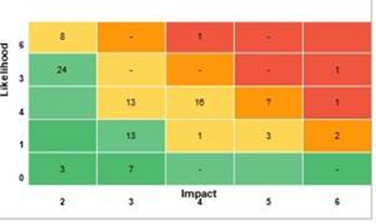
iam back with another query related to this topic . Now user wants to see above risk matrix based on count of risk at each point of the above 5 *5 matrix . Something like below , so user wants to see the tota count of risk at a point of time in the scatter chart . And post that after clicking on the number they want to see the actual risk category details in data point table . 


I tried to create a count measure and give as an input to scatter chart 'Details' tab but this is not being accepted as a column . 

neeharikathota_0-1605172411947.png


Please let me know how to achieve this . 


Thanks in advance . 


amitchandak
Super User
Super User

@neeharikathota , as you have fixed the background image. Better to start and end values for the x and Y axis.  This will makes sure dots are aligned within those limits and might fall on your visual at expcted place.

Share with Power BI Enthusiasts: Full Power BI Video (20 Hours) YouTube
Microsoft Fabric Series 60+ Videos YouTube
Microsoft Fabric Hindi End to End YouTube

Helpful resources

Announcements
Power BI DataViz World Championships

Power BI Dataviz World Championships

The Power BI Data Visualization World Championships is back! Get ahead of the game and start preparing now!

December 2025 Power BI Update Carousel

Power BI Monthly Update - December 2025

Check out the December 2025 Power BI Holiday Recap!

FabCon Atlanta 2026 carousel

FabCon Atlanta 2026

Join us at FabCon Atlanta, March 16-20, for the ultimate Fabric, Power BI, AI and SQL community-led event. Save $200 with code FABCOMM.