Join us at FabCon Atlanta from March 16 - 20, 2026, for the ultimate Fabric, Power BI, AI and SQL community-led event. Save $200 with code FABCOMM.
Register now!The Power BI Data Visualization World Championships is back! Get ahead of the game and start preparing now! Learn more
As a newbie to powerBI I am looking into visualising bookkeeping data into a sankey diagram. mainly to visualize which accounts sum up to all revenue bookings. But I am stuck on how to proceed and would appreciate any hints/thoughts.
The data is basically structured as follows with simple data:
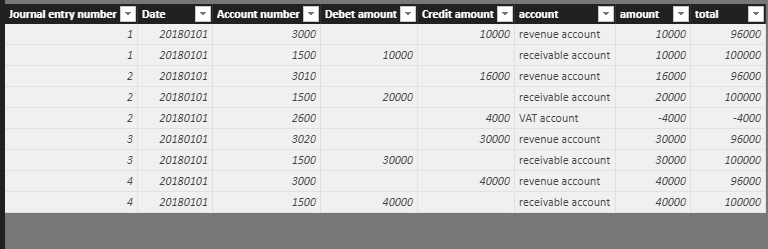
| Journal entry number | Date | Account number | Debet amount | Credit amount |
| 1 | 20180101 | 3000 | 10 000 | |
| 1 | 20180101 | 1500 | 10 000 | |
| 2 | 20180101 | 3010 | 16 000 | |
| 2 | 20180101 | 1500 | 20 000 | |
| 2 | 20180101 | 2600 | 4 000 | |
| 3 | 20180101 | 3020 | 30 000 | |
| 3 | 20180101 | 1500 | 30 000 | |
| 4 | 20180101 | 3000 | 40 000 | |
| 4 | 20180101 | 1500 | 40 000 |
3xxx-accounts are revenue accounts
2600 a VAT account
1500 an accounts receivable account
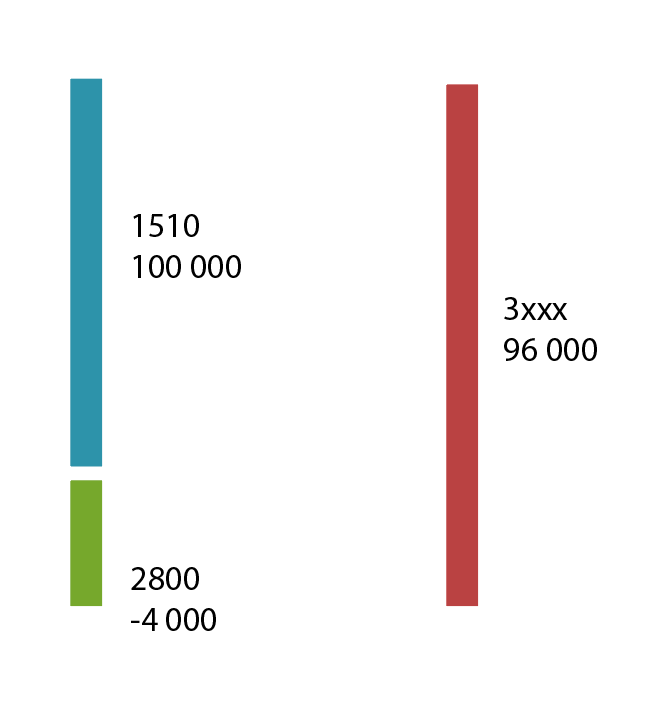
So my goal would be to acheive a diagram for the above showing that total revenue of 10 000 + 16 000 + 30 000 + 40 000 = 96 000 is posted in the bookkeeping with 100 000 against account 1500 and -4 000 against account 2600.
Hi @kevlin79
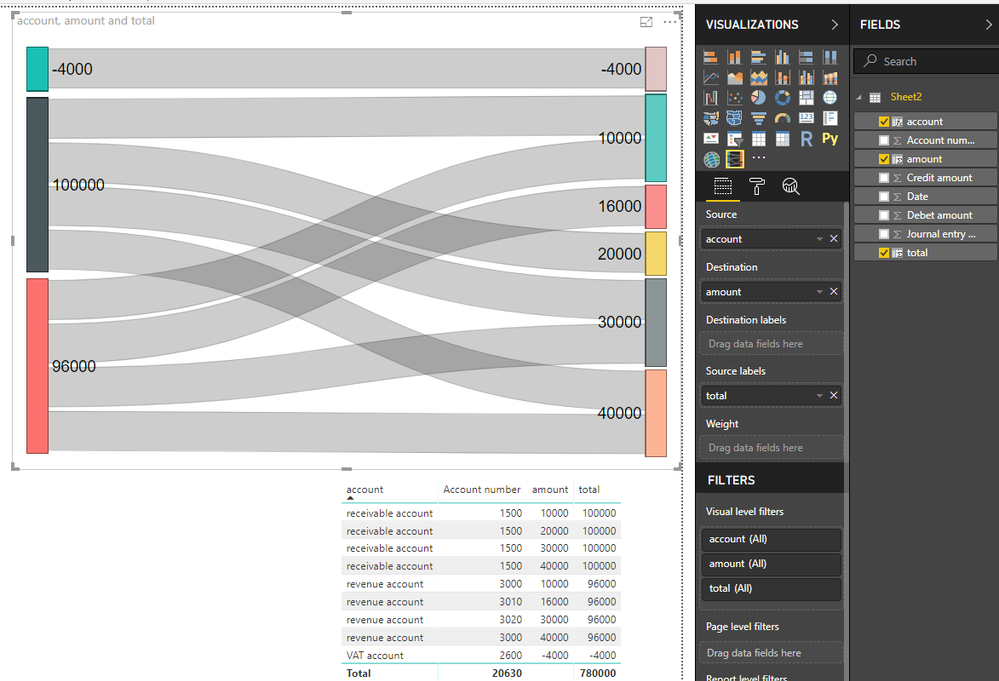
Based on your example dataset and article how to create sankey chart,
I create three calculated columns in your table
category of account number
account = SWITCH ( TRUE (), LEFT ( [Account number] ) = "3", "revenue account", [Account number] = 1500, "receivable account", [Account number] = 2600, "VAT account" )
put amount of each account category from two columns into one column
amount = SWITCH ( TRUE (), LEFT ( [Account number] ) = "3", [Credit amount], [Account number] = 1500, [Debet amount], [Account number] = 2600, - [Credit amount] )
calculate total per account category
total = CALCULATE(SUM(Sheet2[amount]),ALLEXCEPT(Sheet2,Sheet2[account]))
Finally add column to the visual
Best Regards
Maggie
Many thanks for your answer. Believe I need to do some reading. My goal was to achieve a chart like this (manual illustration). Perhaps I need to create an all new table based on the data in the other table (a consolidated table).
Hi @kevlin79
Is your problem sloved,
if so, could you share how you do at your convenience or mark my answer as a solution so that others can get help from this thread?
If bot, please don't hesiate to ask me.
Best Regards
Maggie
The Power BI Data Visualization World Championships is back! Get ahead of the game and start preparing now!
| User | Count |
|---|---|
| 39 | |
| 36 | |
| 33 | |
| 31 | |
| 28 |
| User | Count |
|---|---|
| 128 | |
| 88 | |
| 79 | |
| 68 | |
| 63 |