Don't miss your chance to take the Fabric Data Engineer (DP-700) exam on us!
Learn moreWe've captured the moments from FabCon & SQLCon that everyone is talking about, and we are bringing them to the community, live and on-demand. Starts on April 14th. Register now
Hi,
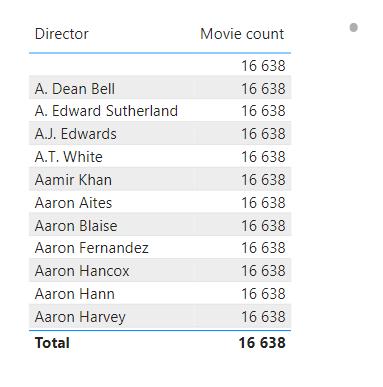
I'm trying to show movie count for movie director however I'm getting the same value in every row and total. Any ideas how to solve it?
Solved! Go to Solution.
Thanks, that helps 🙂
May be the Movie count measure/column is causing issue. Do check the count/count distinct calculations by choosing one repeated movie in the filter!
Hi,
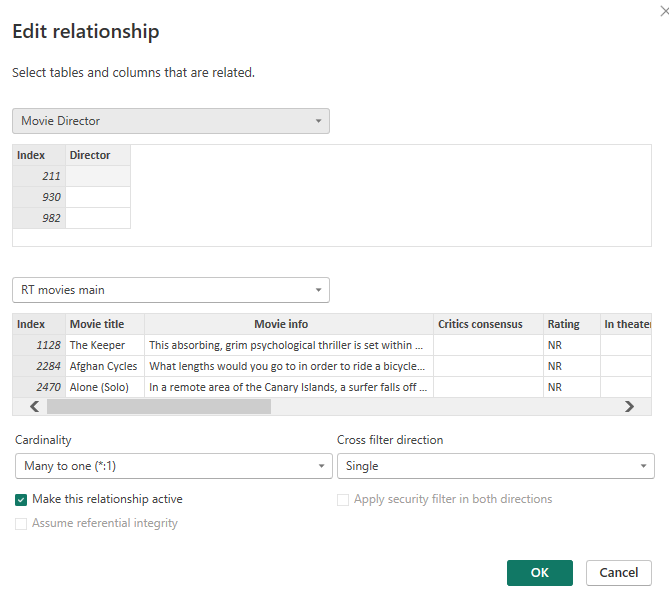
Is there any value in your column Director from your table Movie Director ?
The only thing we are sure about is that your problem is coming from the relationship between your tables, hence the same result on all rows.
Check your relationship and as ssson as it wiil be corrected your results will be correct.
One more thing you can try : The column where the count is made is coming from which table ?
Are you counting using a measure or just the drop down menu from your column ?
Let us know if you found a solution are can you provide us a demo file ?
Here is the link to file https://app.box.com/s/k3yjuxdib1g6begvhxgyw3k83qq9d8aw
If you have recently started exploring Fabric, we'd love to hear how it's going. Your feedback can help with product improvements.
A new Power BI DataViz World Championship is coming this June! Don't miss out on submitting your entry.
Share feedback directly with Fabric product managers, participate in targeted research studies and influence the Fabric roadmap.
| User | Count |
|---|---|
| 53 | |
| 35 | |
| 31 | |
| 19 | |
| 17 |
| User | Count |
|---|---|
| 75 | |
| 72 | |
| 39 | |
| 35 | |
| 23 |