cancel
Showing results for 
Search instead for 
Did you mean: 

Learn from the best! Meet the four finalists headed to the FINALS of the Power BI Dataviz World Championships! Register now

Reply
Anonymous
Not applicable

SSAS Tabular exponential column data mismatch

Exponential.JPG

Hi team,

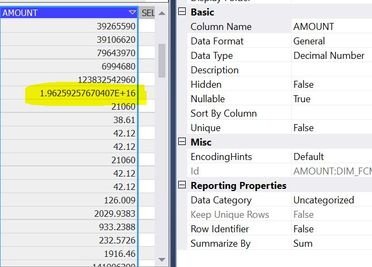
I am facing data mismatch in SSAS tabular model cube beacuse of exponential data in column. refer screenshot for sample data.

DAX: Calculate(sum(Table[Amount]))

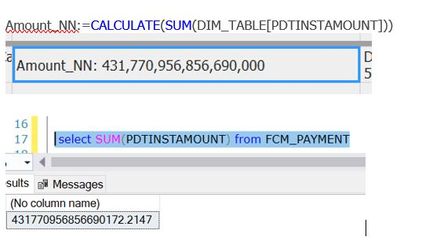
when i compare data with SQL and SSAS cube data not matching. i have to fix this exponential in cube to match data with SQL DB and SSAS Cube. 

would someone can please help me in this regards


regards

SNKM


3 REPLIES 3
idp6134
New Member

I have a similar issue.  The keys I use are defined as 18,0 and they are unique.  They are the PK in the SQL Server DB I use, so I know they are unique.  But when I bring the table into SSAS Tabular it is displayed in scientific notation.  Even if I change the data type to whole number I am not allowed to set the value to unique because SSAS see the numbers as duplicates but they are not.


This needs to be fixed.

amitchandak
Super User
Super User

@Anonymous , Change Data type in SSAS, so that power BI does not get Value like E-16 . They try

Share with Power BI Enthusiasts: Full Power BI Video (20 Hours) YouTube
Microsoft Fabric Series 60+ Videos YouTube
Microsoft Fabric Hindi End to End YouTube
Anonymous
Not applicable

@amitchandak 

even i change data from General to Decimal number no luck, below are the details

row data contains more than 18 digits, when we add table in SSAS cube from SQL DB, column data contains scientific notation which cause in data mismatch. 

1.96E+16

 we have to bring data as is from SQL into cube with out scientific notation to get accurate sum.

SQL column data type is Amount Decimal(38,2)

would you please help 🙂

below is the screenshot.

Exponential1.JPG

Helpful resources

Announcements
Power BI DataViz World Championships carousel

Power BI DataViz World Championships - June 2026

A new Power BI DataViz World Championship is coming this June! Don't miss out on submitting your entry.

Join our Fabric User Panel

Join our Fabric User Panel

Share feedback directly with Fabric product managers, participate in targeted research studies and influence the Fabric roadmap.

March Power BI Update Carousel

Power BI Community Update - March 2026

Check out the March 2026 Power BI update to learn about new features.