This is best Fabric, Power BI, SQL and AI community event. How do we know? The last event sold out! Save €200 with code FABCMTY200.
Register nowThe Fabric community is upgrading! Read all of the details including the timeline and what you can expect. Learn more
Hi!
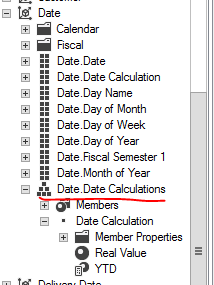
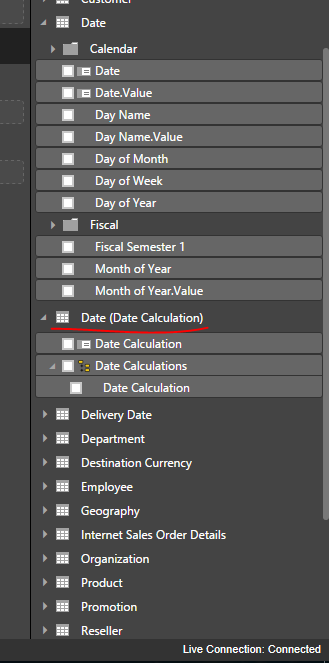
I've not been able to get calculated members working for any other attribute, but a key attribute in a dimension. I've got a sample cube (live connection) with 1 dimension and 1 measure group. Both have default processing settings activated, no unknown member etc. If only key attribute is available in the dimension, calculated member shows up in Power BI Desktop. If I add another attribute to the dimension and change the containing attribute hierachy from the key to the new added attribute hierachy, calculated member doesn't show up anymore.
I've read this article and it should work.
https://powerbi.microsoft.com/en-us/documentation/powerbi-desktop-ssas-multidimensional/
In Excel all works fine.
Am I only suppose to use Calculated Members in Power BI Desktop for a single attribute dimensions?
Thanks,
Kaarel.
I have the same problem. Calculated members are not visible in PowerBI. Measures calculated yes but not members.
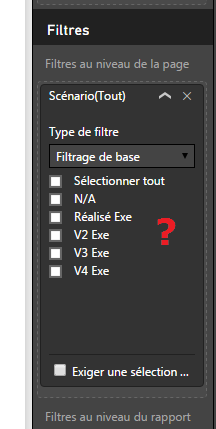
In my exemple the member "Réalisé Exe M-1" of Scenario attribute, is not available in PowerBI. My version is SQL Server 2014.
So I recreated this problem using Adventureworks. I need to filter data based on customers who have had sales in last month, but not in 11 months before the last month. Calculated Member is defined as this:
REATE MEMBER CURRENTCUBE.[Customer].[Customer].[All Customers].[test]
AS IIF
(
[Date].[Month Name].CurrentMember IS [Date].[Month Name].[All Periods]
,null
,Aggregate
(
Except
(
NonEmpty
(
[Customer].[Customer].[Customer]
,(
[Date].[Month Name].CurrentMember
,[Measures].[Internet Sales Amount]
)
)
,NonEmpty
(
[Customer].[Customer].[Customer]
,
{
[Date].[Month Name].CurrentMember.Lag(12)
:
[Date].[Month Name].CurrentMember.Lag(1)
}
*
[Measures].[Internet Sales Amount]
)
)
,[Measures].CurrentMember*1000
)
),
VISIBLE = 1 ;
In Excel in is visible, in PowerBI it is not visible. If I delete all other attributes from the Customer dimension and leave only "customer" key attribute in place, calculated member then shows up in PowerBI. A bug?
I don't not quite understand your question. What do you mean "the calculated members appear when only key attribute is available in dimension"?
As I tested, the calculated member can be loaded into Power BI properly.
Regards,
Join us in Barcelona for FabCon and SQLCon, the Fabric, Power BI, SQL, and AI community event. Save €200 with code FABCMTY200.
| User | Count |
|---|---|
| 27 | |
| 22 | |
| 20 | |
| 18 | |
| 14 |
| User | Count |
|---|---|
| 25 | |
| 20 | |
| 20 | |
| 20 | |
| 20 |