
cancel
Showing results forย 
Search instead forย 
Did you mean:ย 

Data Days is here! Join us now for 60+ days of learning, challenges, and connection. Learn more

Reply
Anonymous
Not applicable

SSAS Connection String for Tabular From Desktop is Formatted Incorrectly

Power BI Desktop version: Version: 2.71.5523.941 64-bit (July 2019)


Tabular connections (live connection) are now being created as Server\\tabular in the desktop when publishing a report.

When trying to use the dataset from the report, we are now getting a message "There is no gateway to access the data source XXX"


The gateway is configured correctly with Server\tabular and the test connection continues to work as expected. We also tried adding the Server\\Tabular but then it wouldn't connect - just to prove that the connection string should be this way.

Is this is known bug? Is there a fix or workarond?  Thanks!

1 ACCEPTED SOLUTION
dax
Community Support
Community Support

Hi dataguy

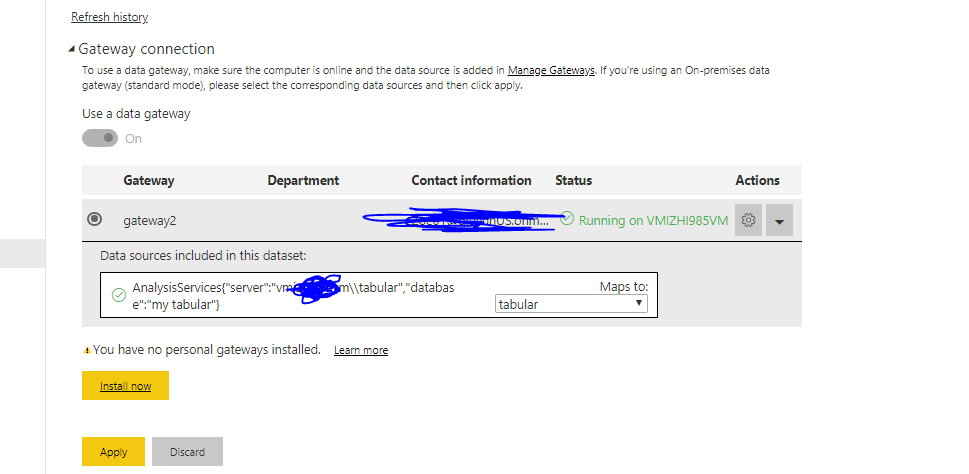
As you could see above, in my image, the datasource information will be server\\instance, but this will show correctly in gateway201.PNG

So I think your problem should be that not mapping to correct gateway.If you have same datasource connection string which exist in gateway, you could map this to corresponding datasource in gateway, like my above image(I map this to tabular). You could try this to see whether it work or not.

Best Regards,
Zoe Zhi

If this post helps, then please consider Accept it as the solution to help the other members find it more quickly.

View solution in original post

4 REPLIES 4
dax
Community Support
Community Support

Hi dataguy,

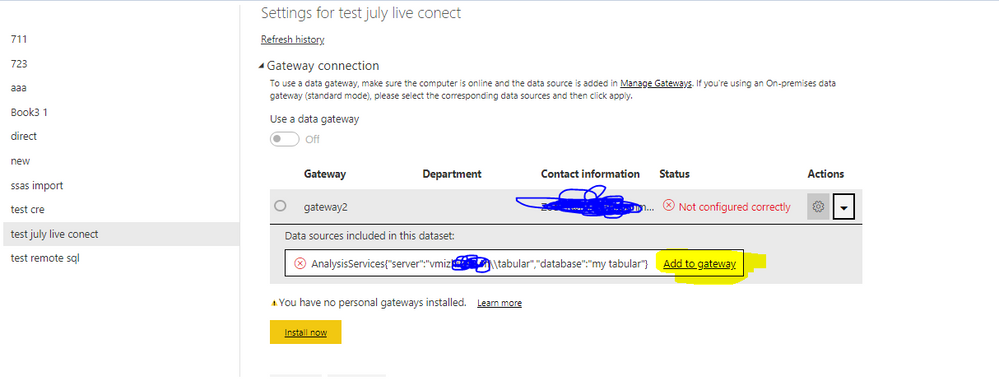
When you use premise datasource, you need to set gatewy way for this. If you didn't set gateway for this datasource, you might will get below error

202.PNG

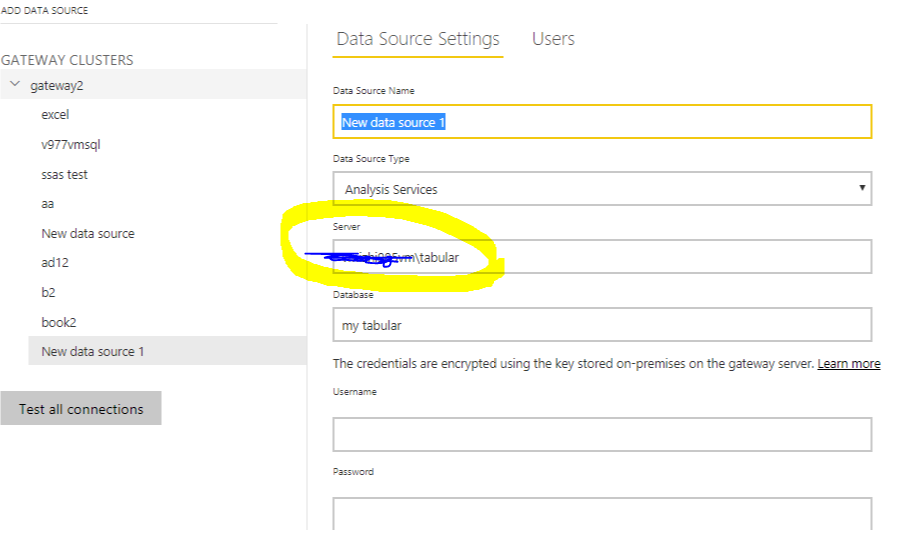
Then when you click to "add to gateway", it will show like below(it will automatically change to server\instance)

200.PNG

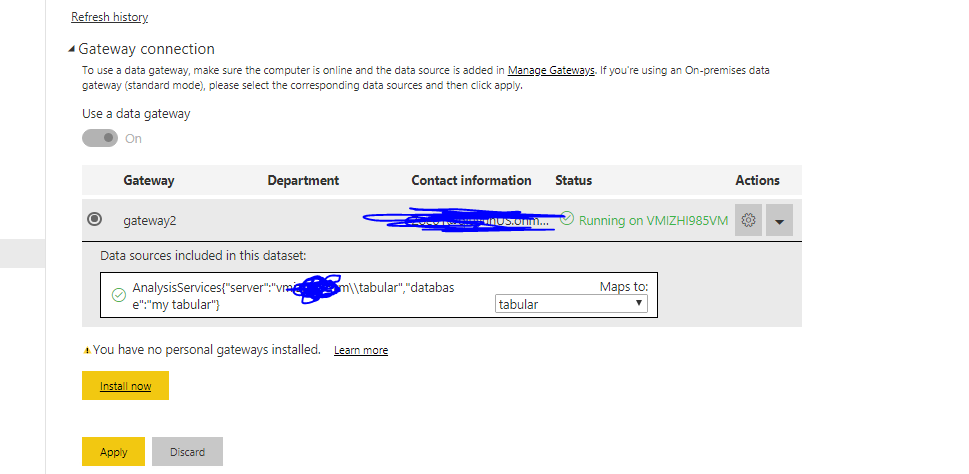
Then you will get result like below

201.PNG

By thw way, to make refresh or get data correctly, you also need to make sure your effective name's mapping correctly

204.PNG

 You could refer to Manage your data source - Analysis Services for details.

Best Regards,
Zoe Zhi

If this post helps, then please consider Accept it as the solution to help the other members find it more quickly.

Anonymous
Not applicable

We have the definition in the gateway just fine. This has worked for us for over a year. 


Recently new published reports cannot access the dataset.


If you go into the Settings for the Dataset, it shows the list of possible Gateways.


Then when you expand one to see why it is not working, it shows - AnalyServices{"server":"myserver\\tabular","database":"MyDatabase"}  Add to Gateway


So as you can see it thinks the connection string needs a \\ which is incorrect. The connection string exists on a gateway and has for over a year as myserver\tabular and has been working.


So any more thoughts?

dax
Community Support
Community Support

Hi dataguy

As you could see above, in my image, the datasource information will be server\\instance, but this will show correctly in gateway201.PNG

So I think your problem should be that not mapping to correct gateway.If you have same datasource connection string which exist in gateway, you could map this to corresponding datasource in gateway, like my above image(I map this to tabular). You could try this to see whether it work or not.

Best Regards,
Zoe Zhi

If this post helps, then please consider Accept it as the solution to help the other members find it more quickly.

Anonymous
Not applicable

Thank you!

Helpful resources

Announcements
Fabric Data Days is here Carousel

Fabric Data Days 2026

Don't miss out on Data Days, June 15 through August 7. Learn Fabric, Power BI, SQL, AI and more.

May Power BI Update Carousel

Power BI Monthly Update - May 2026

Check out the May 2026 Power BI update to learn about new features.

Power BI DataViz World Championships carousel

Power BI DataViz World Championships - June 2026

A new Power BI DataViz World Championship is coming this June! Don't miss out on submitting your entry.