Join us at FabCon Atlanta from March 16 - 20, 2026, for the ultimate Fabric, Power BI, AI and SQL community-led event. Save $200 with code FABCOMM.
Register now!The Power BI Data Visualization World Championships is back! It's time to submit your entry. Live now!
I'm new to DAX and would like to do the following in DAX.
Select a1.accountNumber
From a1 Account, a2 Account
Where a1.AccountNumber == a2.AccountNumber AND a1.AccountDescription != a2.AccountDescription
I'm not really sure how to compare two columns from the same table in DAX. Assigning a table to a variable in DAX does not allow me to access the column in the variable.
Any help would be appreicated.
Solved! Go to Solution.
Hi @vega,
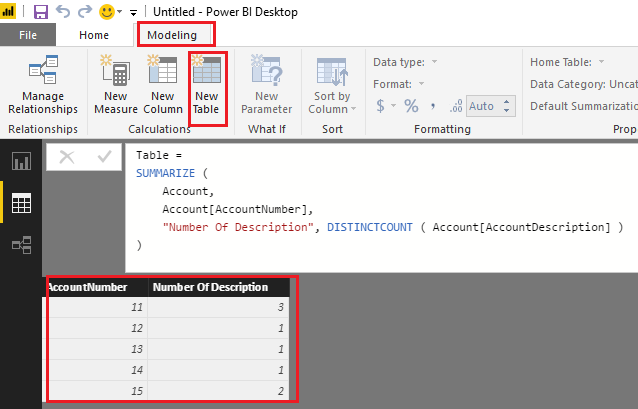
If I understand you correctly, you should be able to simply use the formula below to create new table to get number of AccountDescriptions for each AccountNumber.
Table =
SUMMARIZE (
Account,
Account[AccountNumber],
"Number Of Description", DISTINCTCOUNT ( Account[AccountDescription] )
)
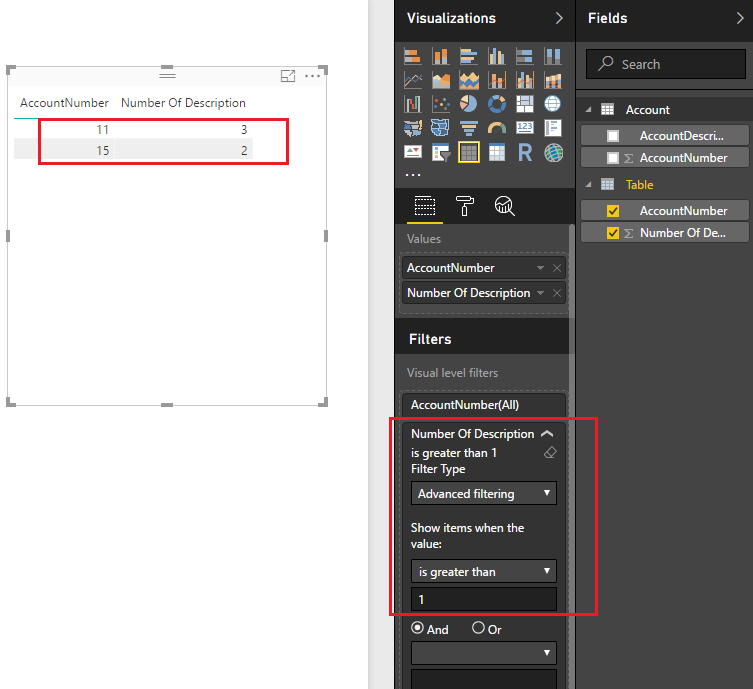
Then you can apply a filter to show only accounts which have the same AccountNumber, but different AccountDescriptions on the report. ![]()
Regards
Hi @vega,
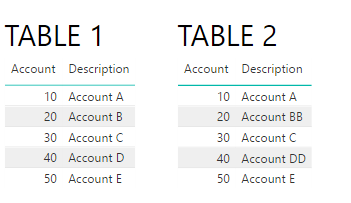
Not really sure what you are aiming to do, do you have two tables in your model and pretend to have it a comparision between the two tables where the account number is equal but the description is diferent?
I created two table with two columns: account and Description
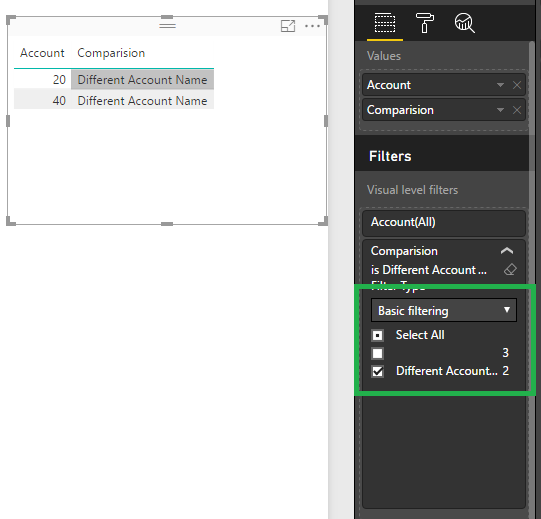
Then create a column in table 1 and put it on your visual and filter out the blanks values:
Comparision =
IF (
LOOKUPVALUE ( Table2[Description], Table2[Account], Table1[Account] )
= Table1[Description],
"",
"Different Account Name"
)
Result is below:
Not sure if this is what you are looking for.
regards,
MFelix
Regards
Miguel Félix
Proud to be a Super User!
Check out my blog: Power BI em PortuguêsI have one table, Accounts. And I want to return all the account which have the same AccountNumber, but different AccountDescriptions. Is it possbile to do this comparison on only one table? I know in SQL I can create an alias for the same table and then do the comparison that way.
Hi @vega,
If I understand you correctly, you should be able to simply use the formula below to create new table to get number of AccountDescriptions for each AccountNumber.
Table =
SUMMARIZE (
Account,
Account[AccountNumber],
"Number Of Description", DISTINCTCOUNT ( Account[AccountDescription] )
)
Then you can apply a filter to show only accounts which have the same AccountNumber, but different AccountDescriptions on the report. ![]()
Regards
I went ahead and marked the above as the solution. I'm sure it's not ideal, as it requires you to make a second table, which requires more space. I was able to solve the problem a different way by using calculated columns. In case anyone is interested the calculated column is as follows:
= NOT( ISEMPTY( FILTER(Query1, [AccountNumber] = EARLIER([AccountNumber]) && [AccountDescription] <> EARLIER([AccountDescription])) ) )
This will create a calculated column where the value is TRUE when the AccountNumber has an identical AccountNumber, but with a different AccountDescription and FALSE if there are no other AccountNumbers which are the same with different AccountDescriptions. I perfer this method as it adds one column. I could not figue out how to get this done as a Measure.
P.S.
Thank you for all of your help I greatly, greatly appreciate it.
The Power BI Data Visualization World Championships is back! It's time to submit your entry.
Check out the January 2026 Power BI update to learn about new features.
| User | Count |
|---|---|
| 69 | |
| 45 | |
| 36 | |
| 28 | |
| 23 |
| User | Count |
|---|---|
| 141 | |
| 124 | |
| 59 | |
| 40 | |
| 32 |