Don't miss your chance to take the Fabric Data Engineer (DP-600) exam for FREE! Find out how by attending the DP-600 session on April 23rd (pacific time), live or on-demand.
Learn moreNext up in the FabCon + SQLCon recap series: The roadmap for Microsoft SQL and Maximizing Developer experiences in Fabric. All sessions are available on-demand after the live show. Register now
I'm new to DAX and would like to do the following in DAX.
Select a1.accountNumber
From a1 Account, a2 Account
Where a1.AccountNumber == a2.AccountNumber AND a1.AccountDescription != a2.AccountDescription
I'm not really sure how to compare two columns from the same table in DAX. Assigning a table to a variable in DAX does not allow me to access the column in the variable.
Any help would be appreicated.
Solved! Go to Solution.
Hi @vega,
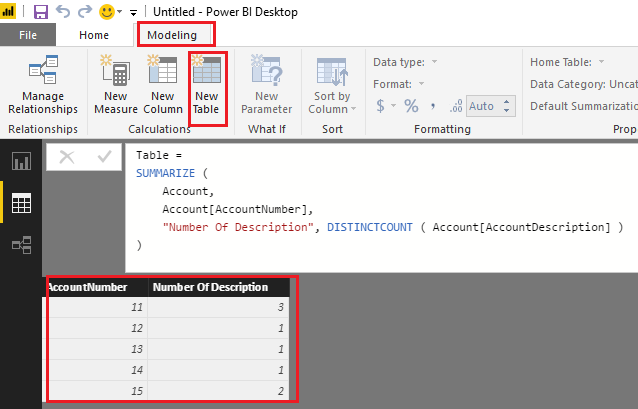
If I understand you correctly, you should be able to simply use the formula below to create new table to get number of AccountDescriptions for each AccountNumber.
Table =
SUMMARIZE (
Account,
Account[AccountNumber],
"Number Of Description", DISTINCTCOUNT ( Account[AccountDescription] )
)
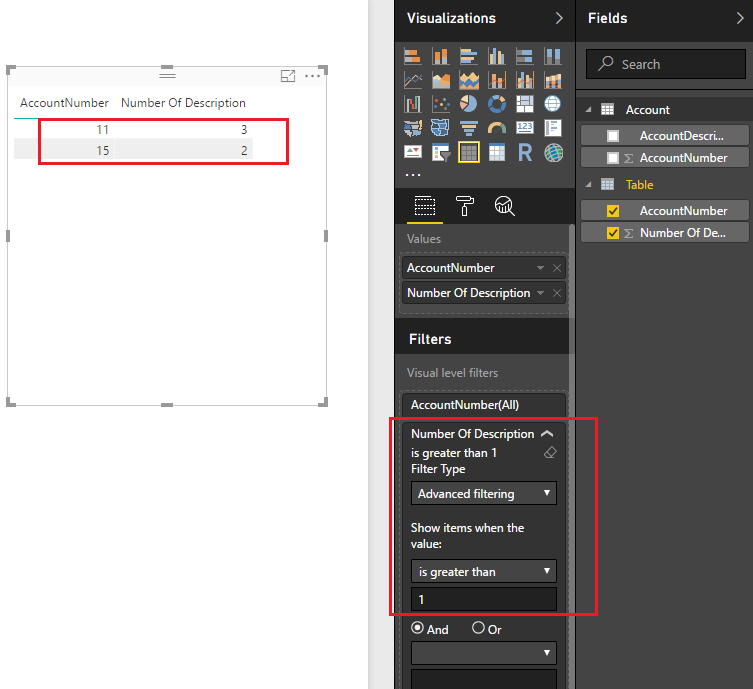
Then you can apply a filter to show only accounts which have the same AccountNumber, but different AccountDescriptions on the report. ![]()
Regards
Hi @vega,
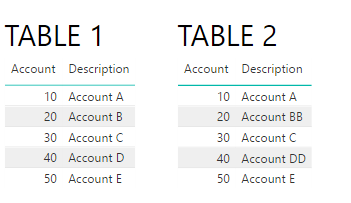
Not really sure what you are aiming to do, do you have two tables in your model and pretend to have it a comparision between the two tables where the account number is equal but the description is diferent?
I created two table with two columns: account and Description
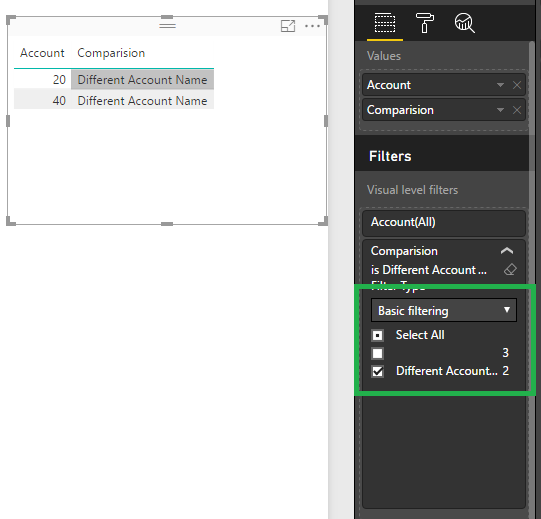
Then create a column in table 1 and put it on your visual and filter out the blanks values:
Comparision =
IF (
LOOKUPVALUE ( Table2[Description], Table2[Account], Table1[Account] )
= Table1[Description],
"",
"Different Account Name"
)
Result is below:
Not sure if this is what you are looking for.
regards,
MFelix
Regards
Miguel Félix
Proud to be a Super User!
Check out my blog: Power BI em PortuguêsI have one table, Accounts. And I want to return all the account which have the same AccountNumber, but different AccountDescriptions. Is it possbile to do this comparison on only one table? I know in SQL I can create an alias for the same table and then do the comparison that way.
Hi @vega,
If I understand you correctly, you should be able to simply use the formula below to create new table to get number of AccountDescriptions for each AccountNumber.
Table =
SUMMARIZE (
Account,
Account[AccountNumber],
"Number Of Description", DISTINCTCOUNT ( Account[AccountDescription] )
)
Then you can apply a filter to show only accounts which have the same AccountNumber, but different AccountDescriptions on the report. ![]()
Regards
I went ahead and marked the above as the solution. I'm sure it's not ideal, as it requires you to make a second table, which requires more space. I was able to solve the problem a different way by using calculated columns. In case anyone is interested the calculated column is as follows:
= NOT( ISEMPTY( FILTER(Query1, [AccountNumber] = EARLIER([AccountNumber]) && [AccountDescription] <> EARLIER([AccountDescription])) ) )
This will create a calculated column where the value is TRUE when the AccountNumber has an identical AccountNumber, but with a different AccountDescription and FALSE if there are no other AccountNumbers which are the same with different AccountDescriptions. I perfer this method as it adds one column. I could not figue out how to get this done as a Measure.
P.S.
Thank you for all of your help I greatly, greatly appreciate it.
If you have recently started exploring Fabric, we'd love to hear how it's going. Your feedback can help with product improvements.
A new Power BI DataViz World Championship is coming this June! Don't miss out on submitting your entry.
Experience the highlights from FabCon & SQLCon, available live and on-demand starting April 14th.
| User | Count |
|---|---|
| 48 | |
| 40 | |
| 37 | |
| 20 | |
| 15 |
| User | Count |
|---|---|
| 70 | |
| 67 | |
| 32 | |
| 27 | |
| 25 |