We've captured the moments from FabCon & SQLCon that everyone is talking about, and we are bringing them to the community, live and on-demand. Starts on April 14th. Register now
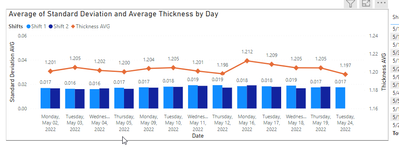
I am working with SQL to pull data into power bi. I made a view in SQL that has only what we consider "Good Data" and here is the table that represents that:
What I am stuck on is how to make a filter where they can see what we consider "not good" data. For example, if there was a piece of debris in the way of the sensor and it caused a miscalculation, I want them to be able to see that as well as it will determine if this is a continuous problem. How should I go about doing this? I'm a lot better with SQL so is it possible to create another view in SQL with the bad data and put that into a slicer? This community is the only place I can ever get accurate and helpful answers, so thank you in advance!
Solved! Go to Solution.
If i understood your question correctly, i will probably do the following:
Create a view with good and bad data, but add a column that (semething like "Data quality") that says if the current row is good data or bad data.
Then in Power BI you can filter your visuals using that field.
Hope it helps
If i understood your question correctly, i will probably do the following:
Create a view with good and bad data, but add a column that (semething like "Data quality") that says if the current row is good data or bad data.
Then in Power BI you can filter your visuals using that field.
Hope it helps
Hey @Anonymous , I have another question that I think you might be able to help with. Lets say I am only wanting to show the "Good" data in my chart, but then I need the "Bad data" to be categorized into five different categories. How would you go about doing this?
@Anonymous See I knew someone on here would have a simpler, cleaner way to get this done. Thanks for your help!
If you have recently started exploring Fabric, we'd love to hear how it's going. Your feedback can help with product improvements.
A new Power BI DataViz World Championship is coming this June! Don't miss out on submitting your entry.
Share feedback directly with Fabric product managers, participate in targeted research studies and influence the Fabric roadmap.
| User | Count |
|---|---|
| 57 | |
| 38 | |
| 33 | |
| 19 | |
| 16 |
| User | Count |
|---|---|
| 68 | |
| 66 | |
| 41 | |
| 34 | |
| 25 |