cancel
Showing results for 
Search instead for 
Did you mean: 

The Power BI Data Visualization World Championships is back! Get ahead of the game and start preparing now! Learn more

Reply
jarednigel07
New Member

SQL Statement Error - SQL Server Database (Import)


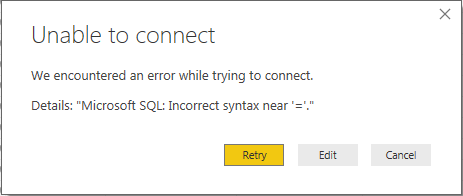
I'm working on a different SQL Statement since I'm trying to load a table using an SQL Statement where the source is an SQL Server Database. So the steps are:
 

SQL Error.PNG

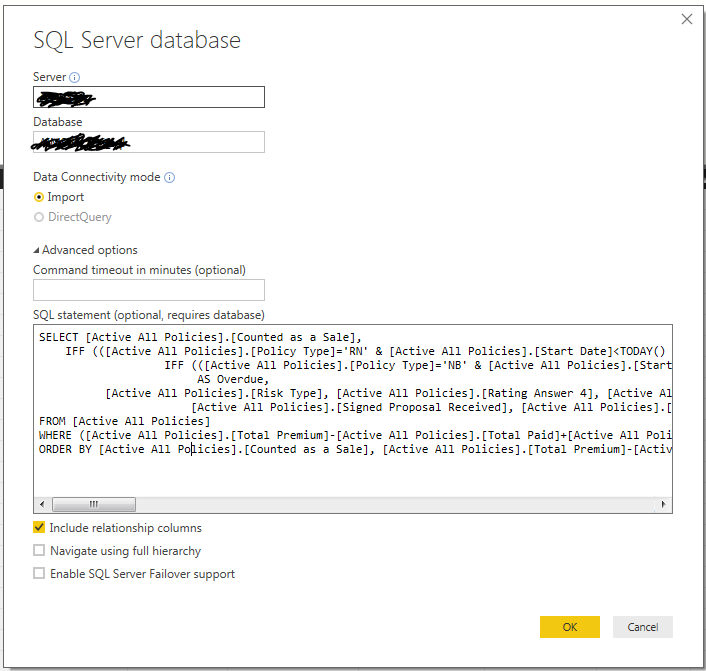
After clicking on OK:

SQL Error2.PNG


Here is the script:


SELECT [Active All Policies].[Counted as a Sale],
IFF (([Active All Policies].[Policy Type]='RN' & [Active All Policies].[Start Date]<TODAY() & [Active All Policies].[Counted as a Sale]='False'), "Yes",
IFF (([Active All Policies].[Policy Type]='NB' & [Active All Policies].[Start Date]<TODAY()-14 & [Active All Policies].[Counted as a Sale]='False'), "Yes", "No"))
AS Overdue,
[Active All Policies].[Risk Type], [Active All Policies].[Rating Answer 4], [Active All Policies].[Start Date], [Active All Policies].[Promotion ID],
[Active All Policies].[Signed Proposal Received], [Active All Policies].[Total Premium]
FROM [Active All Policies]
WHERE ([Active All Policies].[Total Premium]-[Active All Policies].[Total Paid]+[Active All Policies].[Write On or Off Amount]<>0 AND ([Active All Policies].[Payment Process]<>'Instalment' And [Active All Policies].[Payment Process]<>'Lump Sum via Broker') AND ([Active All Policies].[Risk Type]='Motor Vehicle' OR [Active All Policies].[Risk Type]='Payment Protection') AND [Active All Policies].[Total Premium]<>0) OR([Active All Policies].[Counted as a Sale]='False' AND ([Active All Policies].[Risk Type]='Motor Vehicle' OR [Active All Policies].[Risk Type]='Payment Protection') AND [Active All Policies].[Start Date]<=TODAY() AND [Active All Policies].[Total Premium]<>0)
ORDER BY [Active All Policies].[Counted as a Sale], [Active All Policies].[Total Premium]-[Active All Policies].[Total Paid]


Any can point out what I did wrong? Thanks in advance

1 ACCEPTED SOLUTION

Hi @jarednigel07,

Please change the "Yes", "No" to 'Yes','No' , we should use single quotation marks(' ') instead of double quotation marks (" "). Please test your SQL statement in SQL Server Management studio(SSMS) and confirm it works fine. Then past it to Get data navigator, to check if the error disppears.

Best Regards,
Angelia

View solution in original post

4 REPLIES 4
Anonymous
Not applicable

Hi @jarednigel07,


As far as I know there is no IFF function in SQL Server (IIF is perhaps what you wanted to use).


Cheers,
Pawel

Thanks for pointing that out @Anonymous. I have changed it already but still getting the same error. 

Hi @jarednigel07,

Have you resolved your issue? If you have, please mark the right reply as answer, so more people will benefit from it.

Best Regards,
Angelia

Hi @jarednigel07,

Please change the "Yes", "No" to 'Yes','No' , we should use single quotation marks(' ') instead of double quotation marks (" "). Please test your SQL statement in SQL Server Management studio(SSMS) and confirm it works fine. Then past it to Get data navigator, to check if the error disppears.

Best Regards,
Angelia

Helpful resources

Announcements
Power BI DataViz World Championships

Power BI Dataviz World Championships

The Power BI Data Visualization World Championships is back! Get ahead of the game and start preparing now!

December 2025 Power BI Update Carousel

Power BI Monthly Update - December 2025

Check out the December 2025 Power BI Holiday Recap!

FabCon Atlanta 2026 carousel

FabCon Atlanta 2026

Join us at FabCon Atlanta, March 16-20, for the ultimate Fabric, Power BI, AI and SQL community-led event. Save $200 with code FABCOMM.