I'm working on a different SQL Statement since I'm trying to load a table using an SQL Statement where the source is an SQL Server Database. So the steps are:
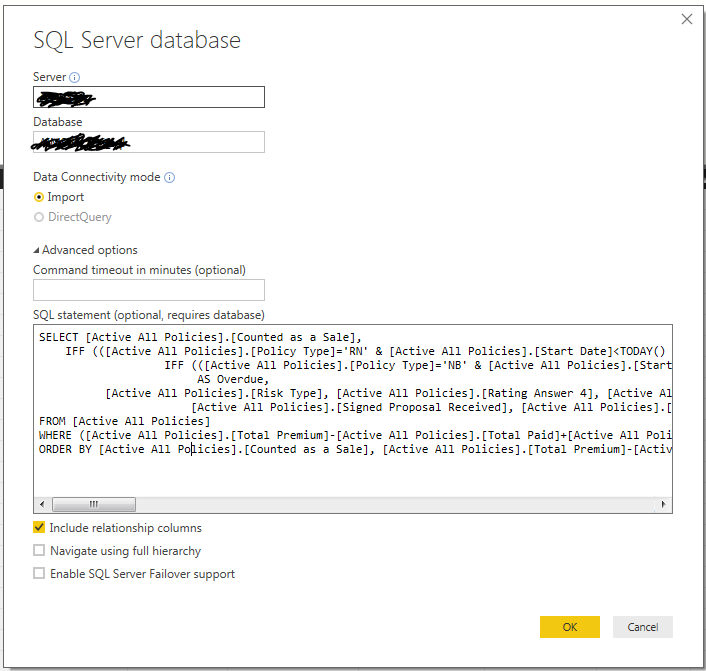
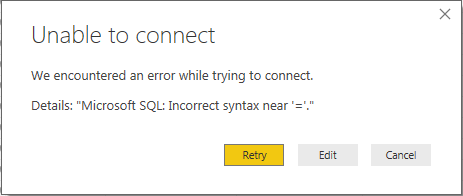
After clicking on OK:
Here is the script:
SELECT [Active All Policies].[Counted as a Sale],
IFF (([Active All Policies].[Policy Type]='RN' & [Active All Policies].[Start Date]<TODAY() & [Active All Policies].[Counted as a Sale]='False'), "Yes",
IFF (([Active All Policies].[Policy Type]='NB' & [Active All Policies].[Start Date]<TODAY()-14 & [Active All Policies].[Counted as a Sale]='False'), "Yes", "No"))
AS Overdue,
[Active All Policies].[Risk Type], [Active All Policies].[Rating Answer 4], [Active All Policies].[Start Date], [Active All Policies].[Promotion ID],
[Active All Policies].[Signed Proposal Received], [Active All Policies].[Total Premium]
FROM [Active All Policies]
WHERE ([Active All Policies].[Total Premium]-[Active All Policies].[Total Paid]+[Active All Policies].[Write On or Off Amount]<>0 AND ([Active All Policies].[Payment Process]<>'Instalment' And [Active All Policies].[Payment Process]<>'Lump Sum via Broker') AND ([Active All Policies].[Risk Type]='Motor Vehicle' OR [Active All Policies].[Risk Type]='Payment Protection') AND [Active All Policies].[Total Premium]<>0) OR([Active All Policies].[Counted as a Sale]='False' AND ([Active All Policies].[Risk Type]='Motor Vehicle' OR [Active All Policies].[Risk Type]='Payment Protection') AND [Active All Policies].[Start Date]<=TODAY() AND [Active All Policies].[Total Premium]<>0)
ORDER BY [Active All Policies].[Counted as a Sale], [Active All Policies].[Total Premium]-[Active All Policies].[Total Paid]
Any can point out what I did wrong? Thanks in advance


