Don't miss your chance to take the Fabric Data Engineer (DP-700) exam on us!
Learn moreWe've captured the moments from FabCon & SQLCon that everyone is talking about, and we are bringing them to the community, live and on-demand. Starts on April 14th. Register now
Hello,
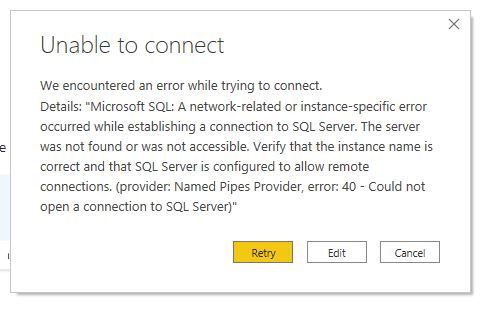
I am new to Power BI but when ever I connect to sql server and as I enter the server name or database name instead of going to credentials of user name and password it goes to this error which I have attached . Kindly tell me what to do or what add . I have heard about port but don't know how to use it . Kindly guide.
Thanks
Hi @Hamdan1234
The problem is that your client computer is not able to connect to the DB instance. There are many reasons that may cause this problem. If you are not the admin of the DB, I would suggest that you ask the DB admin to help investigagte this problem.
Here is a doc about how to troubleshoot this problem: Troubleshoot connecting to the SQL Server Database Engine - SQL Server | Microsoft Docs. Hope this helps.
Regards,
Community Support Team _ Jing
@Hamdan1234 , when you to the user name and password screen, there are three options. Make sure you are using the database option if your use is a database user. By default it is windows user option
If you have recently started exploring Fabric, we'd love to hear how it's going. Your feedback can help with product improvements.
A new Power BI DataViz World Championship is coming this June! Don't miss out on submitting your entry.
Share feedback directly with Fabric product managers, participate in targeted research studies and influence the Fabric roadmap.
| User | Count |
|---|---|
| 52 | |
| 38 | |
| 37 | |
| 19 | |
| 18 |
| User | Count |
|---|---|
| 66 | |
| 63 | |
| 34 | |
| 32 | |
| 21 |