
Don't miss your chance to take exam DP-600 or DP-700 on us!
Request nowLearn from the best! Meet the four finalists headed to the FINALS of the Power BI Dataviz World Championships! Register now
I have a straight up vanilla text field in my SPO list that I'm trying to import its called "DisplayName" there is no evidence of it in power query at all. Its not a calculated column or anything it just holds text. All I can think of is that its using a column name that PowerBI is not able to use?
Ideally I don't want to rename it (Powerapps code will need changing) but I guess if I am forced to I will.
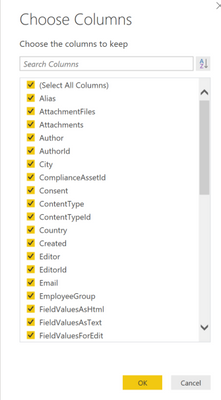
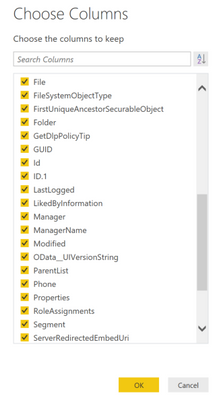
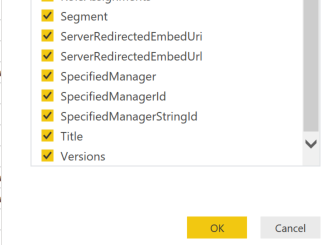
Edit; some screenshots for clarity, the column 'DisplayName' does not apear
Edit 2 - I re-checked the list column name in SharePoint and it is named correctly, reloaded in Powerquery but it cannot find it. I noticed M query handles the ID naming - ID.1
Are you certain that you did not create the column as one name and then rename it? SharePoint tends to keep the original column name and simply masks this with a "display name" while under the hood it still references the original name the column was created as. If you could post the full list of SharePoint columns in that list, we might be able to get there through process of elimination.
Share feedback directly with Fabric product managers, participate in targeted research studies and influence the Fabric roadmap.
Check out the February 2026 Power BI update to learn about new features.
| User | Count |
|---|---|
| 50 | |
| 40 | |
| 37 | |
| 14 | |
| 14 |
| User | Count |
|---|---|
| 85 | |
| 69 | |
| 37 | |
| 28 | |
| 27 |