cancel
Showing results for 
Search instead for 
Did you mean: 

The Power BI Data Visualization World Championships is back! Get ahead of the game and start preparing now! Learn more

Reply
vincentakatoh
Helper IV
Helper IV

SPC chart (I-MR) - Line chart, straight line using Single Value

Hi, 


Objective is to create I-MR chart (simplest of SPC chart type). I'm almost complete with great help from forum. Final help needed.


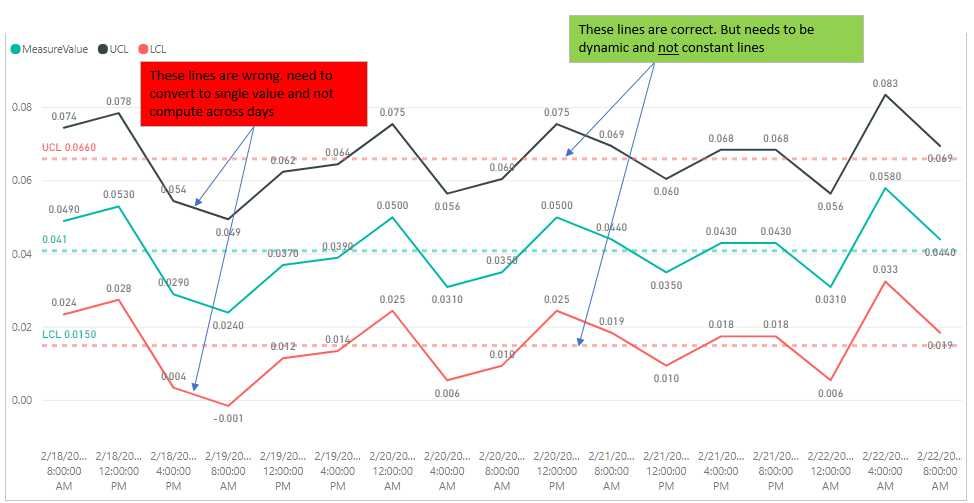
Help needed: In Line Chart, need to add 2 straight lines (from measures). a) Upper Control Limit, UCL and b) Lower Control Limit, LCL. One Single value instead of computing across days. 


Problem: Due to calculations, the UCL and LCL lines are computed across days. My goal is 2 straight lines with UCL= 0.066 and LCL=0.015. Actual data set is much larger, as such i cant use the analytics function to draw 2 constant lines. 


LCL = [Mean]-2.66*[Sigma]

UCL = [Mean]+2.66*[Sigma]

sample pbix https://1drv.ms/u/s!ArjVwEnHONXNgh2-T7FtnCPcmkYg
2018-02-22 21_22_31-Useful Excel - Excel.jpg


Other DAX


UCL = [Mean]+2.66*[Sigma]

Sigma = [MRBar]/1.128

MRBar = AverageX(ALLSELECTED(data1[TimeSPC]);[MovingRange])

MovingRange = 
IF(ISBLANK(data1[EarlierTime]);blank();(
VAR EarlierTime = CALCULATE ( MAX ( data1[TimeSPC] ); FILTER ( ALLSELECTED ( data1[TimeSPC] ); data1[TimeSPC] < SELECTEDVALUE ( data1[TimeSPC] ) ) ) 
VAR EarlierMeasureValue = CALCULATE ( SUM ( data1[MeasureValue] ); data1[TimeSPC] = EarlierTime ) 
RETURN ABS ( EarlierMeasureValue - SUM ( data1[MeasureValue] ) ) ))


4 REPLIES 4
Anonymous
Not applicable

UCLConstant = CALCULATE(  [Mean]+2.66*[Sigma], ALLSELECTED(  data1[TimeSPC]  ))

v-huizhn-msft
Microsoft Employee
Microsoft Employee

Hi @vincentakatoh,

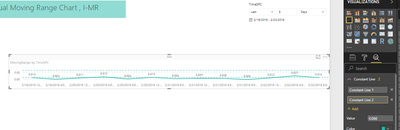
Actually, I am confused your sentence: "Actual data set is much larger, as such i cant use the analytics function to draw 2 constant lines." You can add two lines easily as follows.

1.PNG

Best Regards,
Angelia

Hi @vincentakatoh


When you calculate mean for the year, you will have 2 lines LCL and UCL on a constant value. The measure mean is as follows:


Mean =
CALCULATE (
AVERAGE ( [MeasureValue] );
FILTER ( ALL ( data1 ); data1[MeasureValue] )
)

I have an Excel SPC chart but need to add in data for different data sets and create an interactive  Power BI chart is this possible?

Helpful resources

Announcements
Power BI DataViz World Championships

Power BI Dataviz World Championships

The Power BI Data Visualization World Championships is back! Get ahead of the game and start preparing now!

December 2025 Power BI Update Carousel

Power BI Monthly Update - December 2025

Check out the December 2025 Power BI Holiday Recap!

FabCon Atlanta 2026 carousel

FabCon Atlanta 2026

Join us at FabCon Atlanta, March 16-20, for the ultimate Fabric, Power BI, AI and SQL community-led event. Save $200 with code FABCOMM.