
Join us at FabCon Atlanta from March 16 - 20, 2026, for the ultimate Fabric, Power BI, AI and SQL community-led event. Save $200 with code FABCOMM.
Register now!The Power BI Data Visualization World Championships is back! Get ahead of the game and start preparing now! Learn more
Hello,
I am having trouble figuring out how to report on SLA targets. I’ve been reading other user questions here, but I am having trouble applying their solutions to my data.
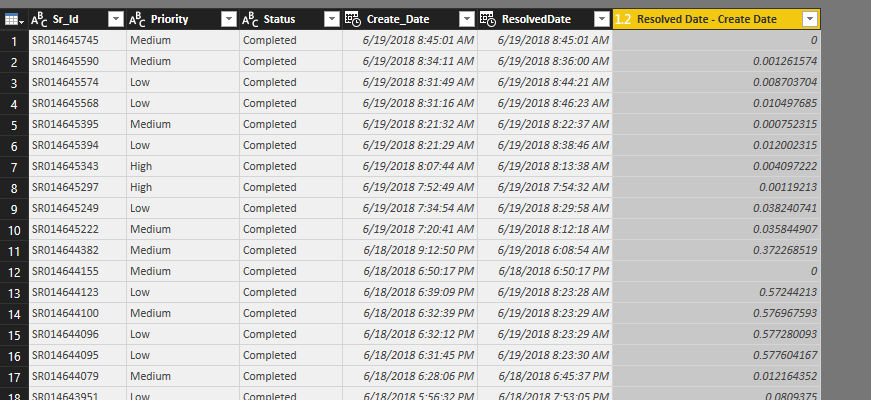
I have a table with ticket number, priority, create date and resolved date. I need to report on whether or not tickets met their SLA by priority. For example, critical priority tickets need to be resolved within 8 hours of creation, high priority tickets needs to be resolved within 16 hours, and medium priority tickets needs to be resolved within 72 hours.
I am not sure how to add this as a calculated column. Is that the right approach? If so, can I get some help with the formula?
I greatly appreciate any advice or help!! Thank you!
Solved! Go to Solution.
Hi,
as far as I see this problem, you should use DATEDIFF function to calculate difference between dates. In it"s 3rd parameter you can set the difference to a hour based format.
After that you can solve this with a simple IF and AND function combo.
I bet It can be solved less complicated but here is my calculated column for that for that:
SLA = IF(AND(Table1[Priority]="Medium",DATEDIFF(Table1[Create_Date],Table1[Resolved Date],HOUR)<=16),"In SLA",IF(AND(Table1[Priority]="Low",DATEDIFF(Table1[Create_Date],Table1[Resolved Date],HOUR)<=72),"In SLA",IF(AND(Table1[Priority]="High",DATEDIFF(Table1[Create_Date],Table1[Resolved Date],HOUR)<=8),"In SLA","Out SLA")))
and here is the table with the resoult:
Hope I could help.
Barna
Hi,
as far as I see this problem, you should use DATEDIFF function to calculate difference between dates. In it"s 3rd parameter you can set the difference to a hour based format.
After that you can solve this with a simple IF and AND function combo.
I bet It can be solved less complicated but here is my calculated column for that for that:
SLA = IF(AND(Table1[Priority]="Medium",DATEDIFF(Table1[Create_Date],Table1[Resolved Date],HOUR)<=16),"In SLA",IF(AND(Table1[Priority]="Low",DATEDIFF(Table1[Create_Date],Table1[Resolved Date],HOUR)<=72),"In SLA",IF(AND(Table1[Priority]="High",DATEDIFF(Table1[Create_Date],Table1[Resolved Date],HOUR)<=8),"In SLA","Out SLA")))
and here is the table with the resoult:
Hope I could help.
Barna
The Power BI Data Visualization World Championships is back! Get ahead of the game and start preparing now!
| User | Count |
|---|---|
| 39 | |
| 37 | |
| 33 | |
| 33 | |
| 29 |
| User | Count |
|---|---|
| 134 | |
| 96 | |
| 78 | |
| 67 | |
| 65 |