
cancel
Showing results for 
Search instead for 
Did you mean: 

July 7 - July 17 | Round 2 of the Power BI Dataviz World Championships. Don't miss your chance! Learn more

Reply
gpauli200
Frequent Visitor

SLA Reporting Help - Calculated Column Formula?

Hello,

I am having trouble figuring out how to report on SLA targets. I’ve been reading other user questions here, but I am having trouble applying their solutions to my data.


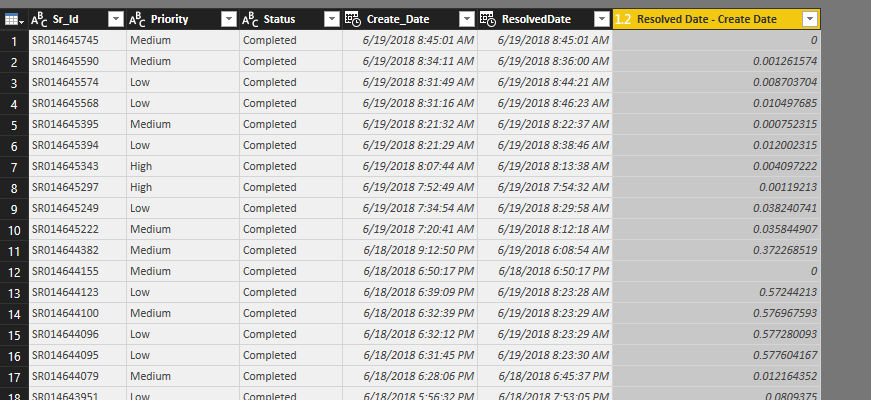
I have a table with ticket number, priority, create date and resolved date. I need to report on whether or not tickets met their SLA by priority. For example, critical priority tickets need to be resolved within 8 hours of creation, high priority tickets needs to be resolved within 16 hours, and medium priority tickets needs to be resolved within 72 hours.


I am not sure how to add this as a calculated column. Is that the right approach? If so, can I get some help with the formula?


I greatly appreciate any advice or help!! Thank you!

Table.PNG

1 ACCEPTED SOLUTION
Barnee
Advocate IV
Advocate IV

Hi,

as far as I see this problem, you should use DATEDIFF function to calculate difference between dates. In it"s 3rd parameter you can set the difference to a hour based format. 
After that you can solve this with a simple IF and AND function combo. 

I bet It can be solved less complicated but here is my calculated column for that for that:

SLA = IF(AND(Table1[Priority]="Medium",DATEDIFF(Table1[Create_Date],Table1[Resolved Date],HOUR)<=16),"In SLA",IF(AND(Table1[Priority]="Low",DATEDIFF(Table1[Create_Date],Table1[Resolved Date],HOUR)<=72),"In SLA",IF(AND(Table1[Priority]="High",DATEDIFF(Table1[Create_Date],Table1[Resolved Date],HOUR)<=8),"In SLA","Out SLA")))

and here is the table with the resoult:
datediff.PNG

Hope I could help.

Barna

View solution in original post

1 REPLY 1
Barnee
Advocate IV
Advocate IV

Hi,

as far as I see this problem, you should use DATEDIFF function to calculate difference between dates. In it"s 3rd parameter you can set the difference to a hour based format. 
After that you can solve this with a simple IF and AND function combo. 

I bet It can be solved less complicated but here is my calculated column for that for that:

SLA = IF(AND(Table1[Priority]="Medium",DATEDIFF(Table1[Create_Date],Table1[Resolved Date],HOUR)<=16),"In SLA",IF(AND(Table1[Priority]="Low",DATEDIFF(Table1[Create_Date],Table1[Resolved Date],HOUR)<=72),"In SLA",IF(AND(Table1[Priority]="High",DATEDIFF(Table1[Create_Date],Table1[Resolved Date],HOUR)<=8),"In SLA","Out SLA")))

and here is the table with the resoult:
datediff.PNG

Hope I could help.

Barna

Helpful resources

Announcements
FabCon and SQLCon Barcelona 2026

FabCon & SQLCon – Barcelona 2026

Join us in Barcelona for FabCon and SQLCon, the Fabric, Power BI, SQL, and AI community event. Save €200 with code FABCMTY200.

60 days of Data Days Carousel

Data Days 2026

Join Fabric Data Days 2026: 60 days of free live/on-demand sessions, challenges, study groups, and certification opportunities.

Power BI DataViz World Championships carousel

Power BI DataViz World Championships - June 2026

A new Power BI DataViz World Championship is coming this June! Don't miss out on submitting your entry.

Top Solution Authors