cancel
Showing results for 
Search instead for 
Did you mean: 

We've captured the moments from FabCon & SQLCon that everyone is talking about, and we are bringing them to the community, live and on-demand. Starts on April 14th. Register now

Reply
GD-L
Frequent Visitor

SAP HANA DirectQuery Column Limit

I'm working with a DirectQuery to SAP HANA.

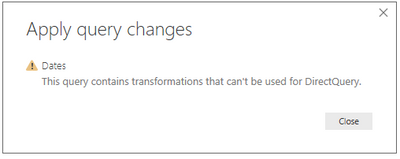
In importing columns the full calculation view has 236 columns. If I try to import all columns via DirectQuery, PBI returnns the error:

GDL_0-1626276510946.png

There are no additional changes aside from adding dimensions and measures.

It appears there's a limit of approx 221columns.

Is this a known issue? According to PBI Documentation the limit should be closer to 16K columns?

1 REPLY 1
Anonymous
Not applicable

Hi @GD-L 

For reference: Connect to SAP HANA databases in Power BI

Limitations and troubleshooting of SAP HANA

When using SAP HANA with Visual Studio, ensure that you've installed compatible versions. For example, when working with Visual Studio 32 bit, make sure you have HANA client 32 bit installed as well.

There are also a few limitations to using SAP HANA, shown below:

  • NVARCHAR strings are truncated to a maximum length of 4000 Unicode characters.
  • SMALLDECIMAL isn't supported.
  • VARBINARY isn't supported.
  • Valid Dates are between 1899/12/30 and 9999/12/31.
  • SAP HANA refresh with SSO is currently not supported for Excel workbook refreshes at the current time. To refresh the data in Power BI, you can use a Power BI report with SAP HANA SSO.

Please check whether you can import from SAP HANA instead of convert to import from direct query.

I found some offical blogs and I hope they could help you:

Connect to SAP HANA data sources by using DirectQuery in Power BI

SAP HANA database


Best Regards,

Rico Zhou


If this post helps, then please consider Accept it as the solution to help the other members find it more quickly. 

Helpful resources

Announcements
New to Fabric survey Carousel

New to Fabric Survey

If you have recently started exploring Fabric, we'd love to hear how it's going. Your feedback can help with product improvements.

Power BI DataViz World Championships carousel

Power BI DataViz World Championships - June 2026

A new Power BI DataViz World Championship is coming this June! Don't miss out on submitting your entry.

Join our Fabric User Panel

Join our Fabric User Panel

Share feedback directly with Fabric product managers, participate in targeted research studies and influence the Fabric roadmap.

March Power BI Update Carousel

Power BI Community Update - March 2026

Check out the March 2026 Power BI update to learn about new features.